Juicy SEO – Monthly Online Marketing Report Covering November 2016

Welcome to Juicy SEO’s monthly SEO report covering all the important changes and news for November 2016.

The idea of this post is for you to quickly read and get up to date with all the important changes that have happened in Online Marketing, SEO and Search Engines.

 

Juicy SEO logo


Mobile index

As reported last month in Octobers SEO report (if you have not read we highly recommend that you do) Google will start using a separate index for mobile versions of websites. This month we have learned a little bit more about this new index.

The difference between using the current Desktop index and the new mobile index for mobile websites is that Google will index and rank pages in their mobile search results using signals from a mobile perspective. This will include things like content on the page, internal links etc. This could affect websites that do not show all the Desktop content, you could be doing this to try and increase page load times for example.
If your website doesn’t have a mobile version (where have you been!), then the mobile index will use the Desktop version of the site.

When the new mobile index is finally launched to the world in a couple of months it shouldn’t affect your websites rankings Google says, it’s just Google performing the same job but in a different way. That said, why would they create this new index if it does the same as the desktop version?

It is very common to hide content on your mobile version of your site behind things like tabs to help make a better user experience for your visitors, after all a mobile screen is a lot smaller and less can be displayed.
In the past Google would not give the full SEO weight for the content which was hidden. This month however Google have confirmed that the new mobile first index will actually give the full weight for hidden content. They just want to make the experience the best it can, like you!

As I mentioned, it’s due to be live in a couple of months and currently testing, they are having a few teething problems which need to be ironed out.

Algorithms

Some webmasters and even some SEO’s (tut tut!) still think there is only one Google algorithm, this is incorrect. All of the search engines have many algorithms managing all sorts of calculations.
Some of these algorithms do not talk to others so, if one algorithm thinks your website is “Good Quality” it doesn’t mean all of them do, something to bare in mind.


Google Search Console

A nice and useful tool Google provides webmasters and SEO’s is Search Console (used to be called webmaster tools) and one of the functions it offers is to crawl and render a page of your website of your choosing. This can help speed up the time that it take Google to index the new page and content.
Using this function does not harm your websites rankings so completely fine to use, however having a page indexed quickly doesn’t help that page rank any better. Still good to do though as your content is in their index quicker!
Juicy SEO customers don’t need to worry about this, we ensure this is performed for all your important new content you create.

Disavow files

A disavow file is used to list links to your website which you think could be harming it in search results. This is a powerful file and unless you know what you are doing you should seek help, like contacting Juicy SEO.
The links in this file should only be external links to your website, not internal links you manage on your site.
If the external link you wish to disavow still exists then keep the link in the file. If however you have managed to remove the link to your website (best option) then it is safe to remove the link from the disavow file.

Domain Length

Size matters!

Well actually not for Google, there isn’t any ranking benefits to having a long domain name.


TLD

As the internet gets more websites webmasters are looking at other types of TLD’s (Top Level Domains) instead of the standard country code or generic TLD’s like .com or .net as the names they want are not available.
If your website uses a “new” type of TLD extension it will not however help your site rank any better or worse, particularly in the field it is associated too.
For example, if you had the site www.cheap-representation.lawyer it will not rank any better for law keywords like “cheap lawyers” or any worse.


EMD – Exact Match Domains

A member of Google’s spam team has asked his followers on Twitter for any spammy versions of EMD they have seen. He is only looking for spammy versions though, for example:


www.where-to-buy-cheap-nike-football-boots.com.

Google has an EMD algorithm which, to be honest, doesn’t run too often. So what can we read into from this message from the Googler? Are they going to run it again soon and need some examples of bad EMD to test on? Maybe they have re-written the algorithm?
Either way, this is something that it looks like Google are working on.
A side note on this, they are only looking and interested in spammy EMD’s, so www.cheaphotels.com should be ok.


And that concludes this month’s report, make sure you catch up on previous month’s reports as they will still be relevant, here is a link to them all:

All SEO Reports


Glossary

Panda: The Google Panda update concentrates on the quality of the web page content, if the algorithm thinks the page is of low quality it might penalise it in Google’s search results.

Penguin: Google has an algorithm called Penguin which analyses links to web pages and identifies which ones are valuable or spam links. An example of a spam link would be a paid link to your site. Since 23rd Sept 2016 this has joined the core search updates and is now real time.

Pigeon: Google’s Pigeon algorithm concentrates on Local SEO, if you have a bricks and mortar business this is something you should take note of.

Phantom (Quality Update): This algorithm rewards website pages for good content.

TDL: A TLD means Top Level Domain like .com or .net or .co.uk.

AMP: Accelerated Mobile Pages. A way to increase the speed your mobile version of your website loads.

EMD: Exact Match Domains. Matching the domain name exactly with the search term used.

 

Juicy SEO – Monthly Online Marketing Report Covering October 2016

Welcome to another edition of Juicy SEO‘s monthly online marketing report this time covering all the important updates and changes for October 2016 by the search engines.

Let’s get right to it…


The SEO road is rarely straight forward

Penguin

At the start of the month we saw the continuation of the roll-out off the new ‘real time’ Penguin update. It took a week or so to fully complete due to the update gradually spreading around the Worlds servers.

Now Penguin is real time several dodgy SEO’s out there are already thinking how they can manipulate this, the obvious one is to increase your link building and if you get a penalty simply remove the links and start again. Google have said that they are “ready for you!” if you are thinking about doing this and could remove the link value of all the links to your site. So, think carefully if you thinking about doing this!


Redirects

This one if really for the webmaster who is moving their site or changing their CMS. It is not good practice to 301 redirect your old pages from your previous version of your website to the homepage of your new website. Google will mark these down as soft 404 pages and which will not pass any link juice (SEO benefit). As much as a pain as it is you should create separate 301’s from your old URLs to the new replacement pages.


Mobile

On the 10th January 2017 Google will be releasing their “Intrusive Interstitial Mobile Penalty“. A what I hear you say?!

From this date if Google finds a pop-up that covers most or all of the mobile screen it will penalise the mobile version of the site. These “pop-ups” are used all over the web and include a lot of social ‘Share’ buttons and adverts. However, Google are only looking at page load and not, say, 5mins after you have been on the site or when leaving the site. Most of the good social share widgets out there will have config options that will fix this. A tool to test this is due out too soon from Google.


Mobile

In the next few months Google will start using a separate index just for mobile devices. At the moment Google uses the main desktop index for both desktop and mobile searches. By using a separate index for mobile devices they can use mobile specific ranking signals like page load speed to help them decide ranking positions.


Content

In some of our previous reports we have mentioned that it is possible to be out-ranked by another website which has a copy of your own content. This is often the case if the other site has a better domain authority than your own. That said, Google this month confirmed that it is also due to other websites taking your content and adding extra value to it, therefore, making the content even better.
This has been a very successful way of ranking Juicy SEO’s clients websites in the past, so if you are looking for some content ideas, research other content out there and make your version better!


HTTP2

As reported previously by Juicy SEO, Google this month also mentioned that they do not pass any search engine ranking ‘help’ if your website is using HTTP2.


AdWords

Google have officially rolled out ‘Click-to-Message‘ sitelinks for adverts which allow people to…. well… click and send a message. I guess the name of it explains the idea well enough.


Domain Authority

Although lots of SEO tools out there have their own “Score” of websites Google have confirmed that they do not have an overall score for a domain (I know I used domain authority above, it was purely to help explain).


Ranking

Finally, Juicy SEO have reported for several years now that it is often the case that Google search engine ranking updates occur at the end of the quarter. A member of Google’s team has also mentioned this month that this is the case. So, keep an eye on the date! 🙂


Glossary

Panda: The Google Panda update concentrates on the quality of the web page content, if the algorithm thinks the page is of low quality it might penalise it in Google’s search results.

Penguin: Google has an algorithm called Penguin which analyses links to web pages and identifies which ones are valuable or spam links. An example of a spam link would be a paid link to your site. Since 23rd Sept 2016 this has joined the core search updates and is now real time.

Pigeon: Google’s Pigeon algorithm concentrates on Local SEO, if you have a bricks and mortar business this is something you should take note of.

Phantom (Quality Update): This algorithm rewards website pages for good content.

TDL: A TLD means Top Level Domain like .com or .net or .co.uk.

AMP: Accelerated Mobile Pages. A way to increase the speed your mobile version of your website loads.

How to identify why my page loads slowly

Today’s post we will be identifying why website pages are slow to load on mobile devices.
We all know how important having a mobile website for today’s internet users and one of the biggest issue website owners have is trying to speed up the load time of the page.

In this post we will try and help identify areas which you can try on your own website using a completely FREE tool which is probably already on your computer. This is Google Chrome Inspect Element.

If you haven’t already we recommend that you first read our post How fast does my mobile website load? before continuing as we will continue on from the end of that post.
….go on then quickly go and read that post, we will wait for you here.

Done?!
Great, welcome back!


So we will continue to use the previous website example of Rolls Royce Motor Cars and see if we can identify areas which will help their homepage load quicker on a mobile device.

Sections of the Inspect Element Panel

In this post we will be concentrating on the Network menu option in Inspect Element and will focus on the main areas of this panel. There is so much you can get out of this tool it would make this post too long if we explained them all. We will only use the columns which will get us the important information quickly.

We will not be needing the left hand panel which shows the website in a mobile device any more so we will concentrate on the right hand panel from now on. However please make sure the left hand panel is set to Apple Iphone6 (just because it is a popular phone) and No Throttling in the Network setting.
Below we will explain what each of the important columns are and how you can use them to help find areas of your website which is slowing down your page from loading.

Column: Name

A website page is made up of many many lines of code, some of the code references other files on your or someone else’s webservers like an image or some JavaScript which manages your Navigation for example. As the page is created it goes through the code line by line to build up the page, in this column you can see each of the files names referenced in order to build the page.

Column: Status

When a page is loaded or a file is referenced there are several states that reference could make. For example if the reference was successful it would create a status code of 200. Another example would be if the reference couldn’t find the file as it is no longer at that location it would produce a 404 status code.

These codes help to provide you with useful clues to why the page it taking a long time to load. After all there isn’t any reason to go looking for some code which is know longer there!

Column: Type

This column tells you the type of file referenced, it could be a jpeg image, a script written in JavaScript or a font file. This is helpful as you can tell if the file is important to the page and experience will tell you that the file might be large and you should pay attention to it.

Column: Size

The all important Size column, as you can probably guess this tells us how big the file is in bytes, if you see a page trying to load a 10Mb image on a mobile device it should send you a pretty big signal something needs to change!

Column: Time

This column shows how long each file referenced took to load, so another very useful column.

Column: Timeline

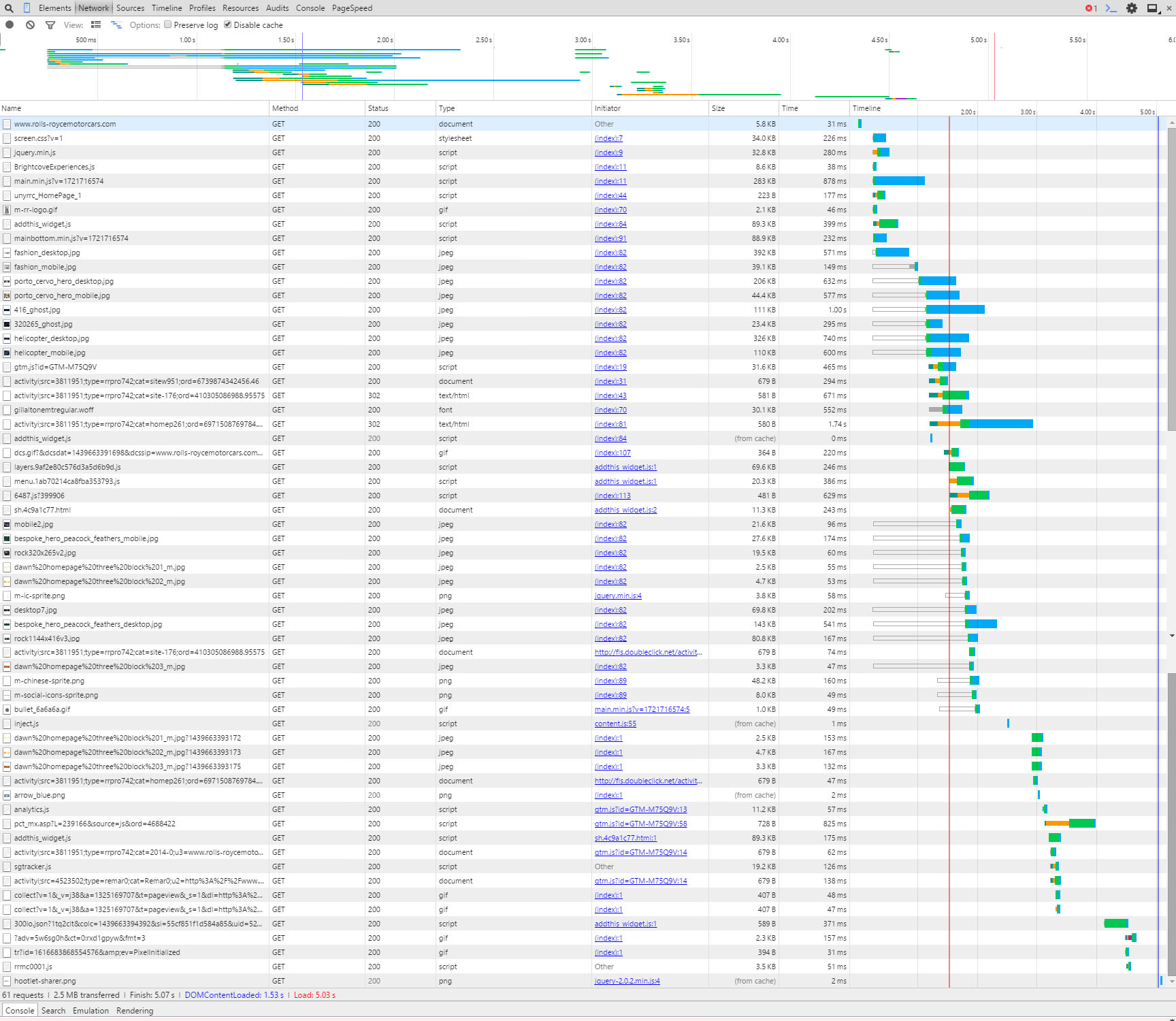
This is the first column I tend to start with, it is a waterfall of the page loading and can identify long loading files quickly. It is shown in a bar graph type display, when you hover over the bar it provides you with further useful information.


Performing a speed test on a mobile device


Ok so lets perform a test now on Rolls Royce’s website and see if we can find anything to help them out.
The first thing we see is that by running the refresh on the page several times it takes just under 5secs to load, ideally we would try to be nearer 3secs if possible so RR (as we are now friends with Rolls Royce I think we can call them RR) should have areas to improve.

Below is a screen grab of the first initial load, you can see the bar graphs really highlighting where the time is lost.
Something to remember at this point is when a page is loading it doesn’t necessarily have to wait for the previous referenced file to load before it starts to load a new file. You can (and advised to) load multiple files at the same time. There are times you can not do this but you should try to do it as much as possible (if you want to know more about that here is a good read).


Initial load of page

Click for a larger version


This column can get quite technical which is not what this post is about, however I will mention that when you hover over the bar graph it will show a time for TTFB, this means:

Time To First Byte
Basically the time it takes to receive the first byte of data from the location (webserver). If this is high then you should speak to your hosting company to try and reduce. If they can’t help, then move to a hosting company that can!

Have a play around with the hover over the bar graph, it’s quite interesting.


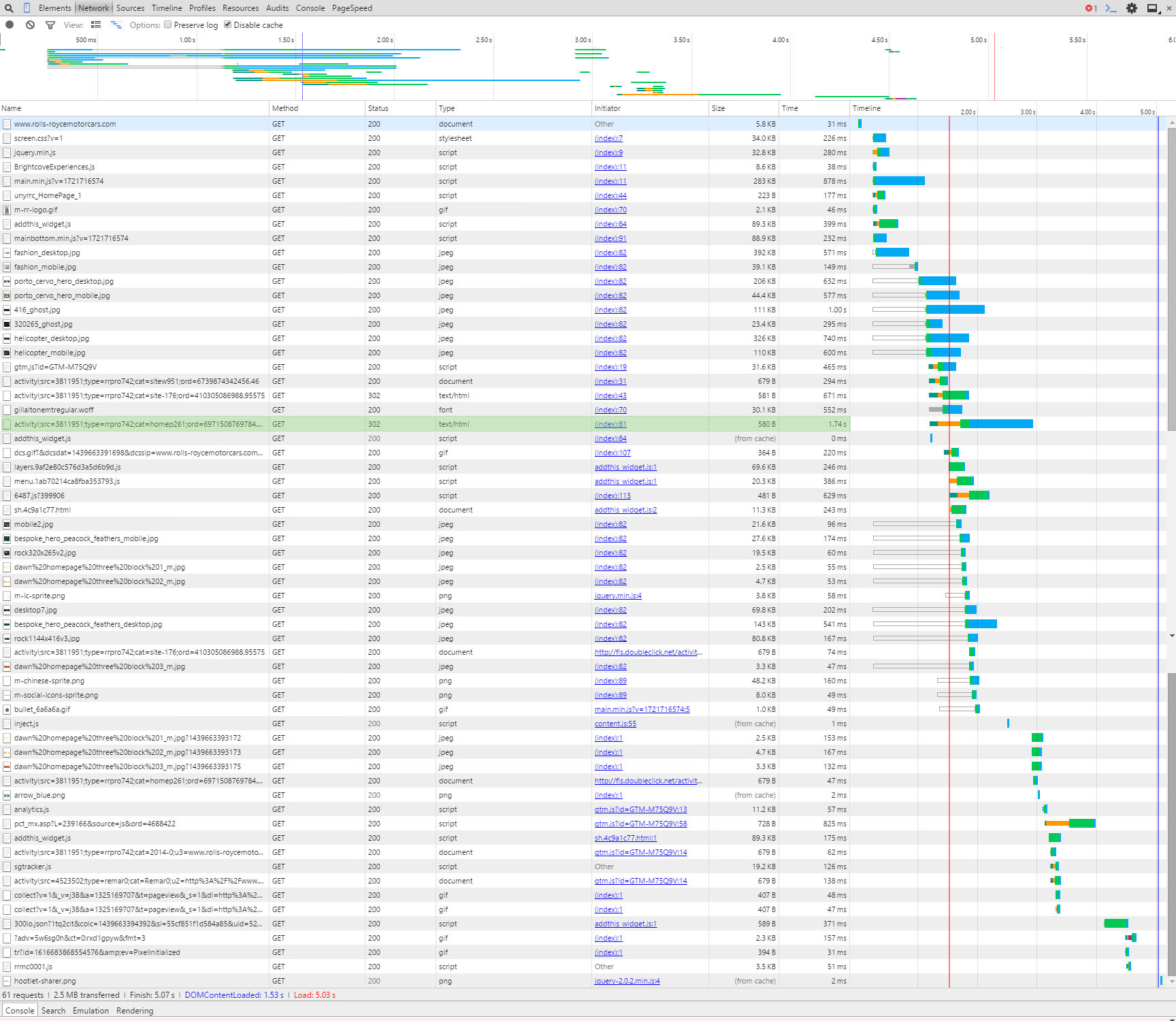
Anyway back to this example, there is one line that sticks out to me, highlighted below:

Doubleclick 302 redirect

Click for a larger version


It is a link to Doubleclick.net (which is an advertising network which we assume RR are using), however it could be taking a long time to complete because it has a 302 status code in the Status column. A 302 code means that there is a redirect (temporary redirect too – another taboo but not for this post) to another page.

So to explain, if they were trying to load a file from www.rubbishwebsite.com/filelocation/ and the owners of www.rubbishwebsite.com moved the file to another location like: www.rubbishwebsite.com/new-filelocation/ they would create a redirect so you can still get to the file.
So for RR’s website to get to the data they want the request for the data from Doubleclick has to go to two locations, by changing their site so it looks at the new location it could help the speed of the page. There are other considerations to this but that is for another post, if you are performing this on your own website and see a 301 or 302 redirect we recommend updating your link.


So that is an example of using the Timeline column, the next example we will use the Name column.
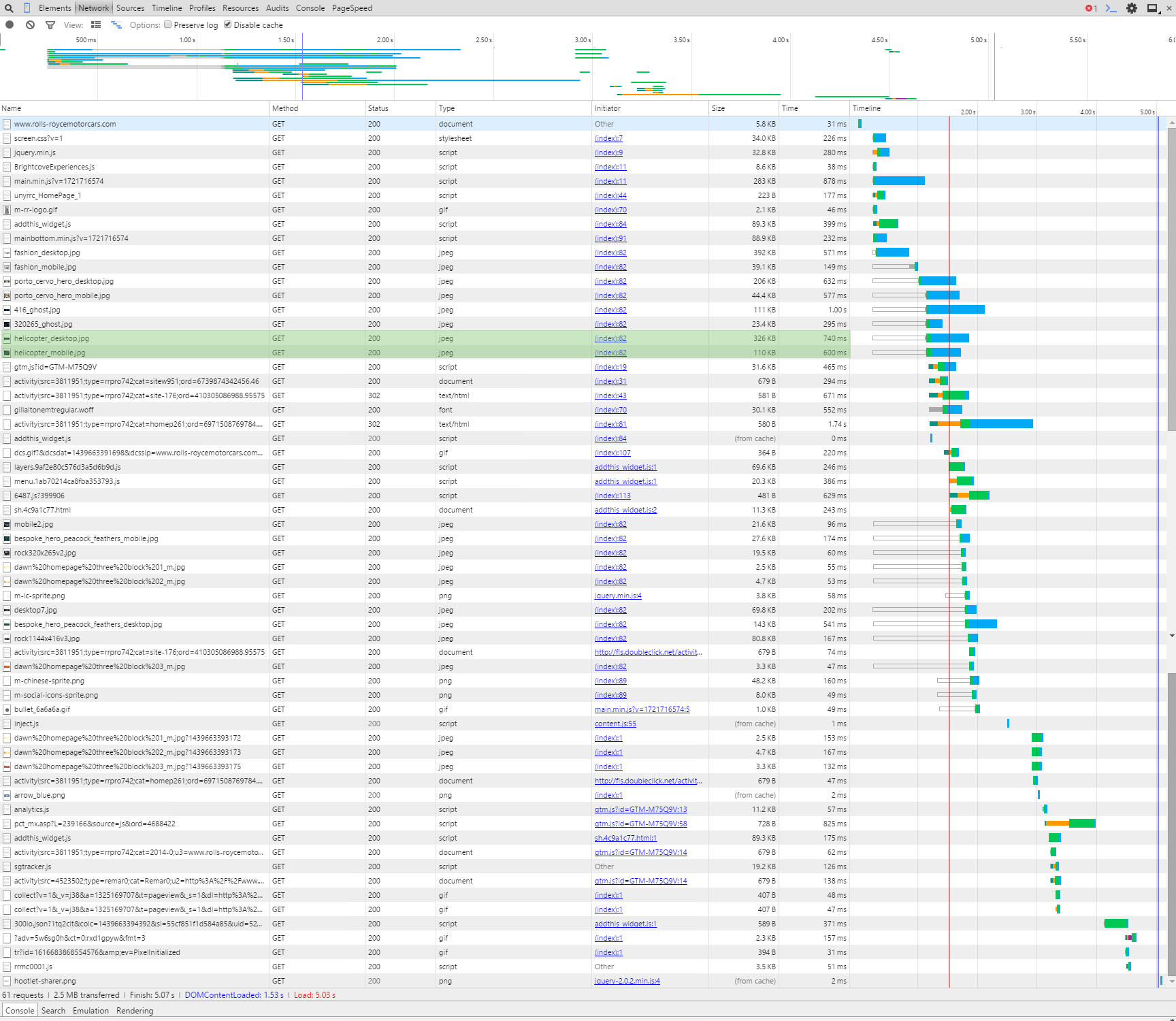
As mentioned above there are two sets of images on this website, one for desktop and the other for mobile devices. It looks like both are being loaded on mobile devices. In the screen grab below you can see the two images highlighted:

Two versions of the helicopter images

Click for a larger version


Obviously loading the correct one only would increase the speed of the page. Additionally the desktop version will be larger in size so would slow down the page load.
Whilst we are talking about images you might or might not know that there are tools that compress images so the byte size of the file is reduced. By compressing images you can save a LOT on page load times.
For example (we love our examples don’t we), the RR website uses an image called helicopter_mobile.jpg, we downloaded this file and it is 110KB, we ran the file through our image compressor and reduced it to 68.8KB, nearly half the size!! If you performed the compression to all their images alone the site would speed up considerably. Here are both the files below so you can see they look the same and there isn’t any loss in quality:


Helicopter Mobile Original
Helicopter image original
Helicopter Mobile Compressed by Juicy SEO
Helicopter image compressed
Credit of images to Rolls Royce Motor Cars, please don’t sue us for using your photos as we are only trying to help.


It’s not all doom and gloom for our best friends at RR, their server looks very quick and if they just sorted out the above it will probably be below 3secs. It just goes to show it’s not just the little businesses that need to work on their mobile websites, the big boys do too!


Now I know what needs to be changed, how do I do it?


You have now identified areas of your website which need a little attention, obviously there are many more reasons which could be slowing your webpage but I have to stop writing soon otherwise it will be tomorrow.
We will leave these to future posts where we will help tackle several of the common problems. If these future posts sound interesting to you we would love to hear from you via social media, after all feedback is the key to creating better content.
Thanks in advance!

PS: Rolls Royce a Wraith or Ghost in that nice blue would look great outside the office! 🙂