How to get real search results in Google

All webmasters are interested in where their website ranks for the keywords they are targeting. Some check monthly, some weekly and the obsessive every day. But how many of them are actually looking at the ‘real’ ranking results?
If you have a Google account, which includes YouTube, Gmail, Googlemail, Google+ etc the results you see in the search results are not ‘true’ organic results. Google gives websites that have been viewed either by yourself or by someone in your Google+ circle more value and ranks the webpage higher than normal.

This post isn’t really for going into why your results aren’t ‘real’, if you have a question on that area let me know in the comments and I will try to answer it.

There are several ways to get ‘real’ ranking results, this is my favourite and I’m not sure how many people use it.

As far as I know this only works in Chrome, let me know if anyone else has got it working in another browser.

The idea is to create your own search engine with extra parameters that removes your personal settings.

  • Open up Google Chrome browser
  • Click on the spanner
  • Settings
  • This will show the basics setting page, click on ‘Manage Search Engines’
  • Scroll down to the bottom of the page where you should see 3 fields for you to fill in
  • This is where you create your new search engine
  • Create a name for it, anything you like in the first field
  • The second field enter in pws
  • And finally the third field should contain: http://www.google.co.uk/search?q=%s&pws=0&gl=uk
  • Press enter and find the newly added search engine in the list
  • If you hover over the entry a ‘Make Default’ button should appear
  • Click it!

That’s it.
To use type into the URL bar the keyword you wish to search for and hey presto ‘real’ search results.
If you still would like to take advantage of the personalised search results just enter your search query into the search bar on the Google homepage.

Hope that helps!
Over Optimisation – Don’t do too much SEO!

About a month ago Google dropped a hint that they will be looking into penalising websites that are over optimised. Lots of people have speculated what this means and when it could happen. We have kept quiet on the subject until we had seen some movement on this. Although we haven’t seen anything negative movement for our clients websites there is a lot of talk about other sites out there which might have been affected.

So what to do and what’s it all about? Well Google have been drumming into us for quite a while that they want quality content which is for the reader, and not for Google’s robot to find keywords on the page. We think they will be continuing on this theme. Make changes to the following areas of your site by making them for the reader:

Title tag: One of the biggest signals (at the moment) for the search engines is the Title tag, we recommend not to stuff your title with keywords. This is the most important line for your site in the search results, therefore use it cleverly and sell your service or product.

Keyword Stuffing: If you have some content on your site purely to get your keywords on to the page, we recommend removing it before this update happens. Replace it with useful content which readers will want to read, if you write the content well you might be able to include one or two of the keywords you removed. But write it for the reader, not Google’s robot.

Internal Linking: Many people still think having every one of your keywords written on a page should link out to the relevant page. To Google this looks like you have purposely added these links into the content to send link value to the internal page, this doesn’t fool Google. The most important internal link for the keyword is the first one, therefore don’t do anymore than one. We are not saying don’t have internal links, in fact the opposite as they are very important. But you really only need one internal link per keyword on a page, if you are using a plugin that  automatically creates links from your keywords we recommend removing it.


Apr 25, 2012 – Update

As if by magic a few hours after we posted the above blog Google had announced that they will be changing their algorithm within the next 3 days. Google’s full statement is here.

Here is a quote:


In the next few days, we’re launching an important algorithm change targeted at web-spam. The change will decrease rankings for sites that we believe are violating Google’s existing quality guidelines.


If you require assistance with your website get in touch!

We hope this help, if you have anything to add or any questions just ask and we will try our best to answer.


How does Google decide which website ranks for each keyword?

Wouldn’t we all like to know the answer to that question?

However Google’s Matt Cutts have made a video which gives you an in site of roughly how Google’s search engines works. He gives you a few little hints on what you should have on your page to help it rank well. Instead of us just repeating what he has said why not watch the video instead, it is worth the time.

[youtube KyCYyoGusqs]

Is your website over optimised?

Over the last couple of weeks Google have made some fairly big changes to their algorithm, one of these is that your website might be given a penalty if it is ‘over optimised’. That’s right this is a bit of a ‘game changer’ to coin a phrase.
So what can you do about it?
Here are a few bullet points (the way we like to display our tips to you, quick and easy to read):
  • Remove links to your site from footers or site-wide links.
  • If your webpage has stuffed keywords, cut them down. You only really need to mention the keyword once or twice max.
  • Are you linking out from every keyword on your page? Stop it and just do it once.
  • Stop focusing on your keywords but more on words related to your keywords.
So what can you do?
  • Content, write unique quality content. It doesn’t have to be war and peace but something good.
  • Make sure your content is for the reader, not for the search engines.
  • Use spell check, typos happen to the best of us so use this handy tool.
A list of the important changes to Google Algorithm in March for SEO are here, we will be creating another one for April too. Follow us on Twitter or Facebook to be alerted or use our RSS feed.

Anchor Text, your days are numbered!

There is a lot of talk about anchor text at the moment, is it still useful and does it still provide any SEO value? Could it hurt your site now instead of helping it?

Well until we hear from Google themselves we can only speculate.

So what is anchor text?

Anchor text are the words that you use to create a link from. For example the anchor text here is ‘Does Googles +1 button help SEO’: Does Google +1 button help SEO

  • We still believe anchor text is still useful but the signal to Google is not as important.
  • We recommend varying the anchor text as much as possible, don’t just have the same keyword on every link.
  • Include the odd ‘click here’ as that is something a human would write naturally.
  • Answer questions for example: Is mobile SEO important to my business? 

If you thought this article was useful we would be very grateful if you would ‘LIKE‘ us to share our wisdom! Thanks.

Googles 50 changes for March

Google have once again released a list of changes they have made to their search algorithm. As usual it is a little vague in places so there is an element of reading between the lines. I have gone through these changes and bullet-pointed the major ones which could affect search engine optimisation. If you would like to read the original post from Google it is here.


  • Freshness – Google have ‘improved’ the algorithm (Panda update) to favour sites that are updated more recently. Our tip is to add a social media feed to the site or keep updating the content (only if relevant) to ensure it is fresh.
  • Changes to image searches – Changes have been made to searching images to find relevant images (not site) for your search. If your site is ranked on page 3 for the keyword it doesn’t mean an image on your site is also. If it is relevant to the keyword it could be on the first page. If you are not optimising images you should be, get in touch we can help, either on Twitter, Facebook or Email.
  • Tweaking of Anchor text – Google have made changes to the value of the anchor text. They obviously haven’t said what the changes are but we advise to vary your anchor text and also use similar words; ie: if your keyword is ‘garden furniture’ a similar anchor text could be ‘turf for lawn’.
  • Updates to UI for mobiles – Changes have been made for mobile devices searching for Apps, they have basically made the results easier to read on smaller screens incorporating app icons, star ratings, prices and download buttons. It’s not just sites selling Apps that need to optimise their sites for mobile devices, ALL sites should be. We have more information on search engine optimisation for mobile devices here.
  • Improvement to detect the quality of a site – They have made changes to how they decide if the site is of quality. This is very very vague, this could mean the quality of the content, the links to it or something completely different.
  • Update to personalisation signals – Google have updated their algorithm which personalises search results. Tip – If you are not using Google+ yet, time to get on board!
  • Removal of ‘stale’ pages – Once again changes which favour fresh content, fewer stale pages will shown up in search results.
  • Improve the date detection on Blogs and Forums – They have improved it, that’s it! If your blog or forum has seen ranking changes this could be involved.
  • Expanded sitelinks for mobile devices – Google have recently launched expanded sitelinks for mobiles, we have an up and coming blog post on this subject soon. We will shout on Twitter/Facebook when it is online.


There you have it!

E-Commerce SEO with Multiple Pages

This post is aimed at webmasters who have an e-commerce website which has more than one page of products. For example if your website sells Lamborghini’s and the first page of your ‘Products’ page displays 10 Lamborghini cars for sale. At the bottom of the page you might have a ‘Next’ button for the visitor to move onto the second page of Lamborghini cars for sale.

So should you do anything special to help out the search engines to index these pages? Well you don’t need to but we think if there is anything you can do to help the search engines index your website then why not help them.

Research has shown that visitors to websites prefer to land on the page which displays all the products (view all) in one continuous list than one of the ‘pages’ which only displays 10 products. Therefore Google has decided to give these pages more priority when it comes to indexing. If Google are going to prioritise these pages then why not help them along the way. There are a few bits of HTML you can use to do this. Using the rel=’next’ and rel=’prev’ link codes will help group these pages together and along with a session ID Google will know which page is connected to which. Using the rel=’canonical’ tag will direct the link juice to the full product list, which in turn will help that page rank better.

Googles webmaster team have created this in depth video explaining your options and it is worth the watch. We have created a SEO lesson section to our website, why not have a look!

If you have any questions about optimising e-commerce websites or about this video please get in contact.


What is Link Juice?

You may have been reading up on Search Engine Optimisation (SEO) and keep coming across a phrase called ‘Link Juice’. Well as our company is based on this phrase we are perfect people to explain it to you.

Link Juice is the value (benefit) you get from links from other websites. For example if you have a link from BBC.co.uk the chances are the value of the link juice is worth more than if you had a link from job-bloggs-website.com.

It doesn’t come in a bottle and you can’t drink it, but to an webmaster or SEO company it’s the World!


Life as an SEO in the UK has just got harder

This week Google have started to roll out their SSL version of their search engine which was first seen in America back in October 2011.

So why does this affect the SEO world in the UK?
Google are very keen to let everyone who wants to know the benefits of SSL (HTTPS) which includes making searches more secure. But to the webmaster or SEO there is a more important side-effect to this change. We will get even less information about the visitors coming onto our websites.

Because Google will be using a secure server (SSL) they will not be able to pass on some of the information we love to know about, like what keyword they used to find the site for example. Google say this only effects less than 10% of searches but we think it is more, and will get more over time.


There are other ways to find most of the information but it is not as easy or exact, time for the SEO to earn their money!

If you thought this article was useful we would be very grateful if you would ‘LIKE‘ us to share our wisdom! Thanks.

Case Study: Mentor Digital

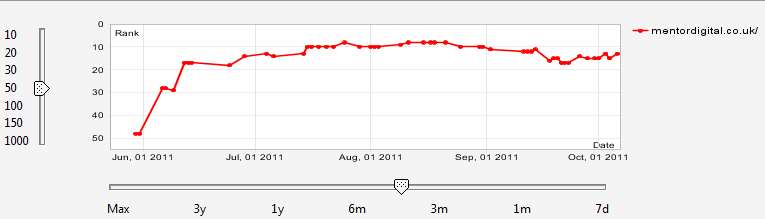
Juicy SEO managed the backlinking campaign for Mentor Digital which produced many quality links from sites within the same industry. We started working on Mentor Digitals highly competitive keywords when they were down on the 5th page of Google. Over the following few weeks we got their main keyword to 8th on the first page of Google.


Mentor Digital Case Study


SEO Lesson Introduction

Over the coming weeks we will be creating easy to follow lessons in SEO which you will be able to implement into your current website or brand new one. We are aiming to create a lesson a week however we might create more, follow us on Twitter and we will let you know when the next lesson Is ready.
Search Engine Optimisation is a very big subject but we will be going through the basics which will not only help your website rank higher in the search engines but increase your visitor numbers.

The idea of these blog lessons are for me to keep short and to the point with little waffle making them quick to read. I will link out to other documentation if areas need further explanation. I hope you learn lots from the lessons and would very much like to hear back with your results after implementing them.

What is SEO and how can it help?
Well in a nut-shell it is a way of tailoring your website so search engines like Google value it highly for the right keywords for your site.
SEO is broken down into two sectors, on-page and off-page.
On-page SEO is what you actually do on the site, like changing the title tags or the content.
Off-page as it suggests is essentially build links from other website to your own.

Over the coming weeks we will be explaining more about SEO, we will tweet when a new lesson is published. If you have any questions along the way simply ask on the post and we will try and answer them as quickly as possible.

How to simply add rel=Author to your website

After reading a lot of articles on the subject of adding rel=”Author” to your website I got very frustrated in the way they were written, even Google was very wordy. So I thought I would write a nice and easy post on how to quickly and easily you can add this important Tag.

What does rel=Author do?

Back in June 2011 Google started using this tag to help people find content by Author. It essentially connects up the authors Google+ account with the article they have written. The tag has been around for a little longer but Google have started using it from then.
Have you seen peoples faces turning up in search results?

Google retrieves these photos from the authors Google+ account.


So down to it, how do I add rel=Author on my website?

There are two parts to setting this up, you first need to create a link from your website to your Google+ account, then create a link from your Google+ to your website.
The easiest way is to add a link or a button on your website, for this example I will use a button. I will also include the image of the button for you too! This will work on your CMS (WordPress, Joomla, Drupal etc) as well as HTML.

Create a Google+ account (if you haven’t already): Here is a link to create an account.

From your website to your Google+ Account:

You will now need to get hold of your profile number, click ‘Profile’ (from Google+ dashboard), in the URL should be a long number.

Add your profile number to the HTML code below:

<a rel=”author” href=”https://plus.google.com/PROFILE-NUMBER-HERE” title=”Find out more about the Author”><img src=”https://www.juicyseo.co.uk/jg/images/author-post/googleplus.png” alt=”Find out more about the Author” /></a>

Here is an example of a button for me:

<a rel=”author” href=”https://plus.google.com/106418152119448278421″  title=”Find out more about the Author”><img src=”https://www.juicyseo.co.uk/jg/images/author-post/googleplus.png” alt=”Find out more about the Author” /></a>

Now copy and paste the code onto your page. Simple!

Now that the link from your website is done you need to create the link back.

From your Google+ account to your website:

In Google+ select ‘Profile’.
Click on the ‘Edit Profile’ button.
On the right hand side click on ‘Contributor to’ button (it doesn’t really look like a button but just words).
Add either the single post address or even the whole website address, which ever is suitable for you. Make sure you select ‘Anyone on the web’ option.
That’s it!

Now to test all is ok Google have created a little tool, here is the link. Fill in the URL of the page you would like to test, the tool should show you what it will look like or let you know if you are missing something.

If this has made adding the Author tag nice and easy for you, please feel free to Tweet, Google +1 or Like this page or send the URL to anyone else you think this would help. All the buttons to help you out are just up there on the right. Thanks.
Here is a little video from those nice chaps at Google all about the Author code.

[youtube gG3Oh7Ues8A]

If you thought this article was useful we would be very grateful if you would ‘LIKE‘ us to share our wisdom! Thanks.