Quick and Easy SEO tips for Small Businesses

Small business owners have to wear many different hats to run their business, adding another one called ‘SEO‘ might seem like one too many. However, there are some very simple things you can incorporate into your day-to-day tasks which will help your website perform better in search engines like Google, here are some handy tips:


Do you want to be kept informed about SEO? Are you interested in free SEO tips? Sign up to our Newsletter and make it easy on yourself!


Blogs

Having words on your website might seem an obvious thing to include when creating a new website, after all how can you explain your product without words? It is not just your customers who need to see words on your site, search engines do too!

Search engines like Google and Bing have very complex algorithms that analyse the words on your page to determine if it is a good match to certain keywords. The problem is what you don’t want to do is create a blog post targeting keywords like “Cheltenham Marketing” and write something like this:


“…Have you ever thought about Cheltenham Marketing? If not then you should as you really need Cheltenham Marketing in your life, it will not only help Market your Cheltenham products but will make you all nice a fuzzy inside!…”


We recommend that you don’t write your content including Blog posts for SEO and targeting keywords, obviously know the keywords you wish to target but you don’t need to be so obvious in the content. Use other words that are related to Cheltenham and Marketing like Gloucestershire and Sales. Search engines are clever enough to know that Cheltenham is connected to Gloucestershire.


Links

Even in 2016 links are still VERY important, we think between 35-40% of all the SEO signals are connected to links. So, make sure you use them!

We recommend adding internal and external links to your content, here is our quick Blog writing template to use:

  1. First paragraph link:

    If you are targeting a keyword then the chances are you have a plan (funnel) where you want all your new traffic to head to after reading your post. Most likely your “Sales Page” where you can convert new sales.
    We recommend adding a link to that “Sales” page in your first paragraph, out of all your links in this post THIS is the most important one!

  2. Authoritative links:

    Adding a link to an external “expert” site can have several benefits. When I say “expert” I mean government or industry body websites, places that are universally recognised.
    Although Google have’nt said (that we know of anyway) that linking out to these types of sites is a ranking figure, we do think it helps search engines understand more about your content and how serious it is.
    Adding extra authoritative content from another site should only help your reader find out more about the subject, they will thank you for it!
    Don’t include the link to near the top, somewhere in the middle is good.

  3. Sales page links:

    Oh the so important Sales page links, most content on a commercial website is to inform the reader about their product or service. If the reader has found your website by landing on your blog post then you need to direct them to your sales page.
    We recommend adding your first link after the first paragraph, something snappy like “Join 1000’s of people and get our SEO Newsletter!“.
    Add another at the bottom too, try a different anchor text to increase your click through chances.


META Tags

Every page of a website needs a Title and Description for the search engines to display in their results page. If you don’t add one yourself then they will fill these fields in themselves with whatever they like, this is NOT a good option!


Title Tag

The META title tag is still one of the most important signals you can configure on your web page. If you are using a CMS like WordPress we recommend installing a plugin called Yoast which makes managing these tags easier.
When writing your Title tag bare the following in mind:

  1. Write it to sell your product and not stuff keywords. This is your BEST sales pitch opportunity for your page, don’t waste it!
  2. Try and keep under 55 chars long as Google will cut off titles that are too long.
  3. Include your keyword, try and make it near the start and write for the reader, not SEO.

Description Tag

Like the Title tag this is important too, after you have got the person’s attention with your fantastic Title tag you need to add some meat to the bone. Describe what the page is about and what the reader will benefit from by clicking to your website. Don’t lie as they will just bounce off your website again, and that it NOT a good thing!
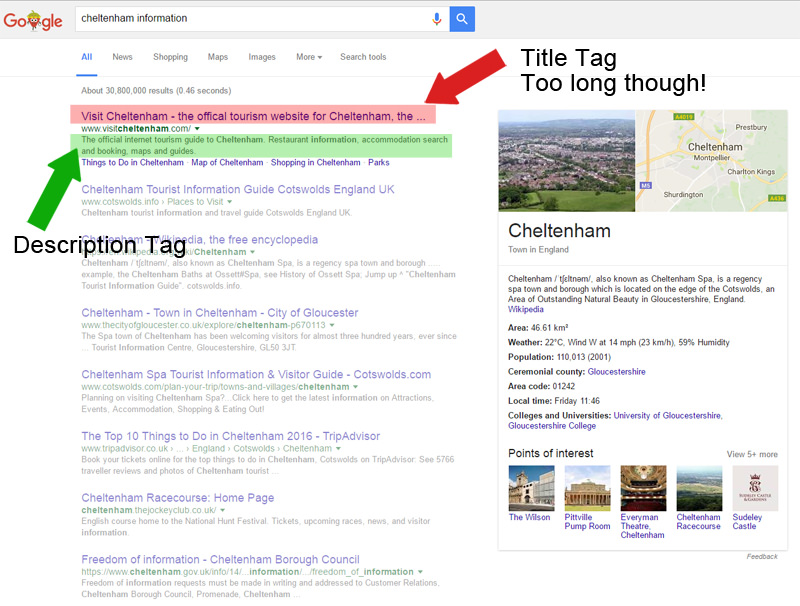
 

Google Search Results Title and Description tags


H1 Tag

This tip is a bonus as I feel it fits within this blog post topic. Without going into this too much, all pages should have a H1 tag.


H1 = Header 1

This is the main header statement for the page. Many CMS’s like WordPress will automatically repeat the Post/Page Title in the H1 tag, which is fine. However, I always think you are missing a trick here. Why not change the Header 1 tag slightly different to the page title to help bring in more keyword targeting possibilities. Let me explain:


If the page’s title is “Cheltenham Marketing Tips” (sticking with the Cheltenham theme, if you don’t know Juicy SEO is based in Cheltenham Gloucestershire), then the H1 tag could be:


“Cheltenham and Gloucestershire Marketing Tips”


Not all CMS’s or the themes within CMS’s make it easy for you to change the H1 tag but if you can try it out and see if the results are good! 🙂

Do you like a good tip?
Then you should get our Newsletter where we not only share some of the best SEO tips we have picked up over the years but also keep you up to date with the latest online marketing news!
CLICK HERE to sign up to our SEO newsletter!


Juicy SEO Monthly Report Covering September 2015

Welcome to the latest copy of Juicy SEO’s Monthly SEO Report. In 2 minutes you will know a lot more than you know now and the bonus is that the new knowledge will help your website perform better in search engines like Google and Bing. So lets not waste any of that 2 minutes and get to it…


General SEO News

 First off in case you haven’t noticed or you don’t use any of the many Google websites, Google have changed their logo. This change will not make any difference in your online marketing campaign but some news nether-the-less.

New Google Logo

 Back in the July edition of our monthly SEO report we reported that Google started to roll out the latest version of Panda called 4.2. This was going to take awhile to roll out, in fact it still is rolling out. However at the end of August / start of September it looks like they backed-out the version, we are not sure why they did this.

 Also at the end of August (around 23rd) Google made a change which adjusted the amount of indexed pages reported in their analytics. In case you don’t know Google provides this figure so you know how many pages are in Google. This now shows a more realistic figure.

 When you need to redirect traffic from one page to another you should use a 301 redirect (unless temp redirections then a 302). An example of why you would create a 301 redirection is if an old page of your website which is no longer live or relevant is still indexed in the search engines, you would redirect the traffic to a newer version of the page and therefore not lose visitors to your website. By creating a 301 you are telling the search engines that they should index the new page and de-index the old page. Google this month have advised to keep these redirections in place for at least a year as it can take that long to remove old pages.

 Google have said that it is OK to create articles on your website and link to the product on the site. That might sound a funny thing for them to say?! Reading between the lines here we think they are seeing a lot of articles which are not related to the products on the website and then linking out to them (a bit spammy!). Tip: Always write the articles to help the reader find what they are looking for not just to create content!

 Google have confirmed that their robots can now actually fill out forms on your website to gain access to content behind the form. This is only done in rare circumstances but something to think about!

 Google+ links have been removed from Google search results. We think this is because of action where Google is seen promoting their own products more than competitors in search results. We also can see the Facebook wannabe slowly get less PR in the future. We still think you should use the network to help in SEO and online marketing however it’s SEO power might be a little less in the future.

 Google are expected to release the latest Penguin algorithm update by the end of the year, after that it should be real-time updates and not run every so often. If you have cleaned up some bad links to your website this is good news. If you still have bad links to your website this could be very bad news for you! If you are not sure give us a shout, we can let you know either way.


This Months SEO Tip

With the latest news above about the new Penguin Algorithm coming this months tip is to clean up those bad links. But how do you know if a link is good or bad? In fact where can you see your links?

First off start in Google Webmaster Tools (Search Console), this will show you a list of links to your website. To identify if the links are bad we recommend looking through these links and look for any which are not connected to your product and in particular anything to do with Viagra, Ray-Ban Sunglasses or UGG boots! 🙂

If you are not sure just send us an email and we will help out.


Glossary

Panda: The Google Panda update concentrates on the quality of the web page content, if the algorithm thinks the page is of low quality it might penalise it in Google’s search results.

Penguin: Google has an algorithm called Penguin which analyses links to web pages and identifies which ones are valuable or spam links. An example of a spam link would be a paid link to your site.

Pigeon: Google’s Pigeon algorithm concentrates on Local SEO, if you have a bricks and mortar business this is something you should take note of.

TDL: A TLD means Top Level Domain like .com or .net or .co.uk.

Honda’s Interactive Video Advert

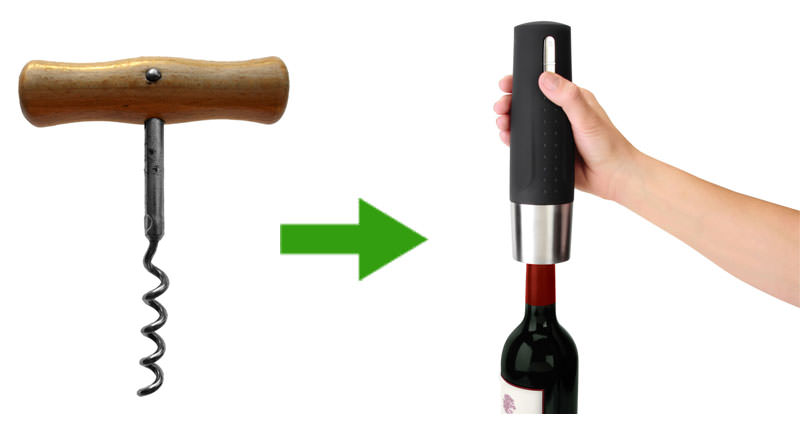
Every now and again a new bit of technology is used to put a different spin on performing a task. It could be new type of cork screw for example, the original one did a good job but the new version is MUCH better!

Cork Screw to Future Crock Screw

The same thing happens in online marketing and online adverts, it could be some animation on a website or some kind of funky popup to encourage you to sign up to the newsletter.

For videos however not a lot has happened over the years, you press the PLAY button and watch the video. We have of course seen some very good video adverts which not only make you want keep watching the video but also buy the product in it. Which is the main idea for most video adverts.

Honda (with a lot of help from their online marketing agency) have produced a new interactive video for one of their new cars. This is the first time we have seen this technology and we are sure we will see similar ones very soon. In the video below there are two versions with different stories playing at the same time, whilst the video is playing if you press the R key on your keyboard you can swap between the two stories. Go on give it ago!

This is very clever (being the first) as it makes you want to watch the complete video, it also highlights their product and keeps you looking at the cars for a long time, and at the end of the video the good old Call to Action button is ready for you.

Have ago and don’t forget to press R!


Juicy SEO Monthly Report for March 2015

It has been another busy month in the world of SEO and online marketing for March 2015, here is your 5 minute run down of what has happened over the past month:

General SEO News:

  • We start off with one for the website designers out there who are still adding a link, generally in the footer of clients websites advertising that they created the site. About 3-4 years ago adding links to footers would have helped the web designers site rank better by generating a link to their site.
    However the world and Google have changed a lot since then and this month Google have STRONGLY suggested adding a rel=”nofollow” tag to these links. This will of course not pass on any link Juice to your site but it will also not provide you with any penalties.
  • WordPress websites using the popular Yoast SEO plugin were vulnerable to a possible hack this month. Yoast discovered this very quickly and sent out an update to fix, if you have not updated your website plugin to the latest version you should do this now. This just highlights that it is very important to make sure your WordPress Plugins and Themes are running on the latest versions.

Panda News:

The Google Panda update concentrates on the quality of the web page, if the algorithm thinks the page is of low quality it might penalise it in the Google search results.

  • The last time the Panda algorithm update was run was around the start of November 2014, if you were hit with a Panda penalty you are sadly still being penalised. It just goes to show how long it can be between updates.

Penguin News (including link building):

Google has an algorithm called Penguin which analyses links to web pages and identifies which ones are valuable or spam links. An example of a spam link would be a paid link to your site.

  • The Penguin algorithm was planned to run every month and for a while it did, however an update now has not happened since December 2014. We do not know when the next update is due, but it’s due.

Pigeon News:

Google’s Pigeon algorithm concentrates on Local SEO, if you have a bricks and mortar business this is something you should take note of.

No news for the Pigeon algorithm for this month.

Mobile SEO:

  • You may remember we have mentioned previously that on the 21st April Google will be making a update in their algorithm relating to Mobile friendly websites (see our What is a Mobile Website post for more on this). Recently Google have added some more information about this update by stating that if you update your webpage to become mobile friendly AFTER this date Google will almost immediately update the mobile value of that page in its mobile search results. Therefore if on the 21st April you do not have a mobile website and then on the 30th April you make your website mobile friendly, when Google next crawls your website it will update it’s mobile search results with your new website. No need to wait for an algorithm update here!
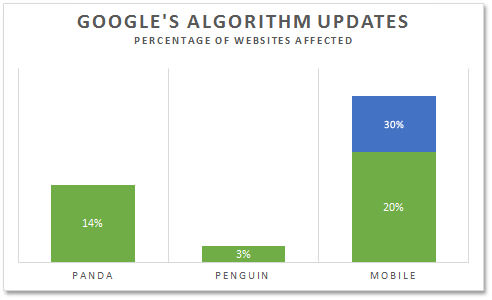
  • The Mobile algorithm update will affect more websites than the Panda and Penguin updates when introduced, this means more than 20% (probably nearer 30%) of all websites will be affected.

Googles Mobile Algorithm Update

This Months SEO Tip:

Google have also said that it will decide if your website pages are mobile friendly rather than the whole website. Therefore if you can’t make the whole of your site mobile friendly at first then start off with the most important pages first. This will help non-CMS websites.


If you missed last months report head over to the Juicy SEO monthly report for February 2015.