Juicy SEO Monthly Report Covering October 2015

Welcome to another Juicy SEO’s Monthly SEO Report where you will be informed of all the important changes in SEO from over the last month. So get a cup of Tea or Coffee and a couple of biscuits and find out what has happened in the ever changing world of SEO for October 2015.


General SEO News

 This month Google confirmed if you have duplicate content on the same site and you haven’t set up canonical tags then it will choose the shortest URL to index. What this means is if you think or know you have more than one copy of the same content (text) on more than one page of your website you should use a HTML tag called canonical. This will inform the search engines which page should be indexed.

 Google released a new algorithm, clearly they need more algorithms! This one will target hacked websites, the idea is to remove hacked sites from their index. This is expected to affect around 5% of searches. Google are trying to remove spam websites which are just a real pain. Good news for website owners whose site have not been hacked.


Incidentally we have an interesting post coming soon which shows you how you can tell if your website is hacked, not as obvious as you would think!


 If you think some of the pages on your website are being penalised by the Panda algorithm Google have recommended not to remove the pages but to improve the content instead. You can of course use the <noindex> tag to inform the search engines not to index the page if you don’t have the time to update the content.

 We reported a few months ago in our monthly report that more people are using Mobile devices to search via Google than desktop computers in the UK. This month it has moved on a little more as this is now the case for all searches for the whole world rather than just the UK and a few other countries.

 More updates from the Panda algorithm (see Glossary below to remind you which algorithm is which) over the last couple of weeks, lots of websites affected.


A big statement from Google!!


 There has been reports in the SEO world the Google updated their core ranking algorithm, this happened around 21st/22nd October. If your ranking positions changed around then it is most likely due to this.

 Yahoo and Google have made an agreement for Yahoo to show Google search results and adverts. This is not live yet but should be in the coming months. If you are not performing well on Bing but only Google then this is good news for you as at the moment Yahoo only shows Bing results (plus their own).

 A big statement from Google recently that 40% of the top 5 search results are now Apps. That is a huge figure, if an App would help your business then now might a good time to create one.

 Google have said on record that there will be a Penguin update before the end of the year. We think there is still time to sort out your bad links to your website now but don’t hang around!

Juicy SEO 120 second Monthly SEO Report

This Months SEO Tip


This months tip HAS to be about APPs, as mentioned above they are being seen in search results by a LOT of people and now is the time to utilise this.

So for this example we will pick the most non-APP type online business we can think of here in the office to show you there is always a wayLets say you are selling fish online, yep fish! What on earth can an online fish seller use an APP for?

Maybe:

  1. Because APPs use push technology you can inform people of new products.
  2. Recipes, we all like to know new ways to cook our fish don’t we? The APP could have a top 10 of Salmon dishes.
  3. Increase sales, if the recipe says you need 20kg of Tuna (thats a lot!) then the APP could have button to buy quick and easy from you.

We could go on but I think you get the idea.

There are two ways you could create an APP, either in-house (you!) if you have the skills or happy to learn or to hire someone else to do it for you.

Our advice is start simple, don’t spend too much money or time and get it out there as quick as possible. You can always keep adding to it over time after it is live. Make sure your customers know what the APP will do as you don’t want bad ratings if they were expecting more or something different.

If you want more info or would like to ask us any questions on this head over to Twitter or Facebook, we only have 2mins so ran out of time here.


PS: Incidentally if you want to buy fish online try out Springs Smoked Salmon!


Glossary

Panda: The Google Panda update concentrates on the quality of the web page content, if the algorithm thinks the page is of low quality it might penalise it in Google’s search results.

Penguin: Google has an algorithm called Penguin which analyses links to web pages and identifies which ones are valuable or spam links. An example of a spam link would be a paid link to your site.

Pigeon: Google’s Pigeon algorithm concentrates on Local SEO, if you have a bricks and mortar business this is something you should take note of.

TDL: A TLD means Top Level Domain like .com or .net or .co.uk.
Juicy SEO Monthly Report Covering September 2015

Welcome to the latest copy of Juicy SEO’s Monthly SEO Report. In 2 minutes you will know a lot more than you know now and the bonus is that the new knowledge will help your website perform better in search engines like Google and Bing. So lets not waste any of that 2 minutes and get to it…


General SEO News

 First off in case you haven’t noticed or you don’t use any of the many Google websites, Google have changed their logo. This change will not make any difference in your online marketing campaign but some news nether-the-less.

New Google Logo

 Back in the July edition of our monthly SEO report we reported that Google started to roll out the latest version of Panda called 4.2. This was going to take awhile to roll out, in fact it still is rolling out. However at the end of August / start of September it looks like they backed-out the version, we are not sure why they did this.

 Also at the end of August (around 23rd) Google made a change which adjusted the amount of indexed pages reported in their analytics. In case you don’t know Google provides this figure so you know how many pages are in Google. This now shows a more realistic figure.

 When you need to redirect traffic from one page to another you should use a 301 redirect (unless temp redirections then a 302). An example of why you would create a 301 redirection is if an old page of your website which is no longer live or relevant is still indexed in the search engines, you would redirect the traffic to a newer version of the page and therefore not lose visitors to your website. By creating a 301 you are telling the search engines that they should index the new page and de-index the old page. Google this month have advised to keep these redirections in place for at least a year as it can take that long to remove old pages.

 Google have said that it is OK to create articles on your website and link to the product on the site. That might sound a funny thing for them to say?! Reading between the lines here we think they are seeing a lot of articles which are not related to the products on the website and then linking out to them (a bit spammy!). Tip: Always write the articles to help the reader find what they are looking for not just to create content!

 Google have confirmed that their robots can now actually fill out forms on your website to gain access to content behind the form. This is only done in rare circumstances but something to think about!

 Google+ links have been removed from Google search results. We think this is because of action where Google is seen promoting their own products more than competitors in search results. We also can see the Facebook wannabe slowly get less PR in the future. We still think you should use the network to help in SEO and online marketing however it’s SEO power might be a little less in the future.

 Google are expected to release the latest Penguin algorithm update by the end of the year, after that it should be real-time updates and not run every so often. If you have cleaned up some bad links to your website this is good news. If you still have bad links to your website this could be very bad news for you! If you are not sure give us a shout, we can let you know either way.


This Months SEO Tip

With the latest news above about the new Penguin Algorithm coming this months tip is to clean up those bad links. But how do you know if a link is good or bad? In fact where can you see your links?

First off start in Google Webmaster Tools (Search Console), this will show you a list of links to your website. To identify if the links are bad we recommend looking through these links and look for any which are not connected to your product and in particular anything to do with Viagra, Ray-Ban Sunglasses or UGG boots! 🙂

If you are not sure just send us an email and we will help out.


Glossary

Panda: The Google Panda update concentrates on the quality of the web page content, if the algorithm thinks the page is of low quality it might penalise it in Google’s search results.

Penguin: Google has an algorithm called Penguin which analyses links to web pages and identifies which ones are valuable or spam links. An example of a spam link would be a paid link to your site.

Pigeon: Google’s Pigeon algorithm concentrates on Local SEO, if you have a bricks and mortar business this is something you should take note of.

TDL: A TLD means Top Level Domain like .com or .net or .co.uk.
Has Google had its day?

I know what you are thinking “are you mad!?”.

Well before you say that lets just recap on a few things that have happened over the last couple of decades on the Internet. Remember Altavista? Or maybe Netscape? They were big at one point, also AOL (I know they are still around but they used to be huge!).

The fact is things move on so don’t be surprised in 10 years time Google isn’t the biggest boy any more (once I figure it out, it will be me! 🙂 ).


Anyway back to the subject in hand, the reason for this post is that each month a company called comScore  release a report that monitors search engine usage in the US, and we know what happens in the US tends to happen in the UK a little later.

Google Going

For desktop searches in August Google lost market share to Bing and Yahoo, although they are still the biggest with 63.8% (down from 64%) of all desktop searches a drop is still a drop.


So that is it, Google will be gone within a year then?


Ahh not quite, those clever chaps and chapesses in GoogleLand knew this was going to happen a couple of years ago (we have talked about it many times of the years). They knew that in the coming years we won’t be using desktop computers as much to search online, we would be going mobile!


Google currently control nearly 90% of all mobile searches in the US, now that’s control! But they can’t sit tight and they know this, the future will be here before you know it and it might not be mobile searches any more. Apps will be playing a bigger part in our lives in the future (Google know this hence why they are buying App companies) and then there is voice search – the future?


So to conclude although Google has lost a little ground and the chances are they will loose a little more, if you are holding any Google shares I wouldn’t worry they seem to be in control.


Juicy SEO Monthly Report Covering August 2015

Welcome to the latest copy of our Monthly SEO Report from Juicy SEO. Once again we have created our 2 minute monthly SEO catch up post which highlights all the important changes that have happened over the last 4 weeks with search engines. So lets get right to it…


General SEO News

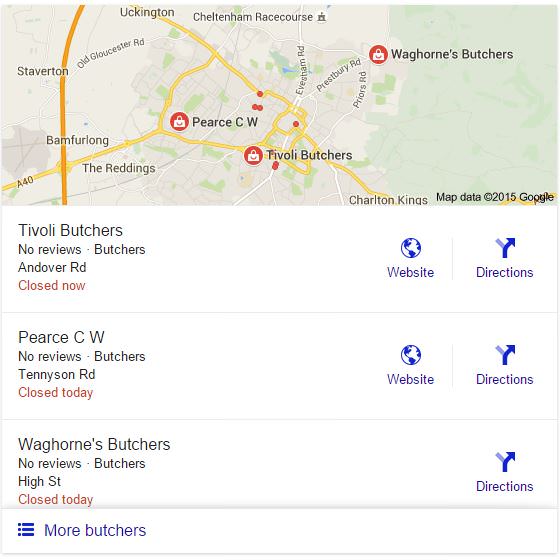
 This month we saw a significant change by Google where they have changed the amount of local businesses listed in their local business ‘Pack’. This is the section in the organic search results you would see when searching for a local business, there is a separate section for these websites which try and help them rank better. Previously the search engine would list 7 websites however this has now been reduced to 3.

Local search results 3 pack

As you can see on our example here there is now just the 3 websites listed with a button at the bottom to see more, this has now made it much harder to rank in the local pack listings.

Don't forget to sign up to our SEO newsletter!

Email Address:

 We have mentioned this before in previous Monthly SEO Reports but the subject of Interstitial pages might become a negative ranking factor in the future, I can’t imagine anyone actually likes these pages so it would be nice to see them go. To remind you that these are pages that are displayed before or after the page you are trying to get to, often with adverts. This is very similar to the Door Way pages we discussed in our Monthly SEO Report for May 2015. If you have these on your website we recommend you remove them very soon!

 You may remember we mentioned before that Twitter tweets are now included into Mobile search results in Google. Well Google have now increased the usage of tweets and they are now included in Desktop search results too. Once again if you are not using Twitter as a business tool you are missing out!


This Months SEO Tip

In case you missed our blog post on How Fast does my Mobile website load and How to identify why my page loads slowly you should head over there as they are a couple of very easy to follow examples which can help your website load quicker. Speed of a website is going to play a bigger part in SEO in the future!


Glossary

Panda: The Google Panda update concentrates on the quality of the web page content, if the algorithm thinks the page is of low quality it might penalise it in Google’s search results.

Penguin: Google has an algorithm called Penguin which analyses links to web pages and identifies which ones are valuable or spam links. An example of a spam link would be a paid link to your site.

Pigeon: Google’s Pigeon algorithm concentrates on Local SEO, if you have a bricks and mortar business this is something you should take note of.

TDL: A TLD means Top Level Domain like .com or .net or .co.uk.
 

How to identify why my page loads slowly

Today’s post we will be identifying why website pages are slow to load on mobile devices.
We all know how important having a mobile website for today’s internet users and one of the biggest issue website owners have is trying to speed up the load time of the page.

In this post we will try and help identify areas which you can try on your own website using a completely FREE tool which is probably already on your computer. This is Google Chrome Inspect Element.

If you haven’t already we recommend that you first read our post How fast does my mobile website load? before continuing as we will continue on from the end of that post.
….go on then quickly go and read that post, we will wait for you here.

Done?!
Great, welcome back!


So we will continue to use the previous website example of Rolls Royce Motor Cars and see if we can identify areas which will help their homepage load quicker on a mobile device.

Sections of the Inspect Element Panel

In this post we will be concentrating on the Network menu option in Inspect Element and will focus on the main areas of this panel. There is so much you can get out of this tool it would make this post too long if we explained them all. We will only use the columns which will get us the important information quickly.

We will not be needing the left hand panel which shows the website in a mobile device any more so we will concentrate on the right hand panel from now on. However please make sure the left hand panel is set to Apple Iphone6 (just because it is a popular phone) and No Throttling in the Network setting.
Below we will explain what each of the important columns are and how you can use them to help find areas of your website which is slowing down your page from loading.

Column: Name

A website page is made up of many many lines of code, some of the code references other files on your or someone else’s webservers like an image or some JavaScript which manages your Navigation for example. As the page is created it goes through the code line by line to build up the page, in this column you can see each of the files names referenced in order to build the page.

Column: Status

When a page is loaded or a file is referenced there are several states that reference could make. For example if the reference was successful it would create a status code of 200. Another example would be if the reference couldn’t find the file as it is no longer at that location it would produce a 404 status code.

These codes help to provide you with useful clues to why the page it taking a long time to load. After all there isn’t any reason to go looking for some code which is know longer there!

Column: Type

This column tells you the type of file referenced, it could be a jpeg image, a script written in JavaScript or a font file. This is helpful as you can tell if the file is important to the page and experience will tell you that the file might be large and you should pay attention to it.

Column: Size

The all important Size column, as you can probably guess this tells us how big the file is in bytes, if you see a page trying to load a 10Mb image on a mobile device it should send you a pretty big signal something needs to change!

Column: Time

This column shows how long each file referenced took to load, so another very useful column.

Column: Timeline

This is the first column I tend to start with, it is a waterfall of the page loading and can identify long loading files quickly. It is shown in a bar graph type display, when you hover over the bar it provides you with further useful information.


Performing a speed test on a mobile device


Ok so lets perform a test now on Rolls Royce’s website and see if we can find anything to help them out.
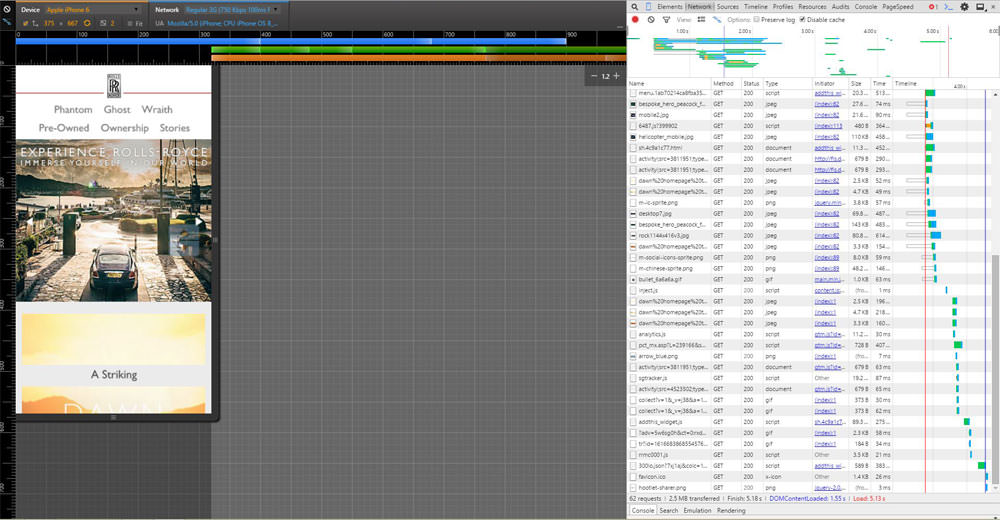
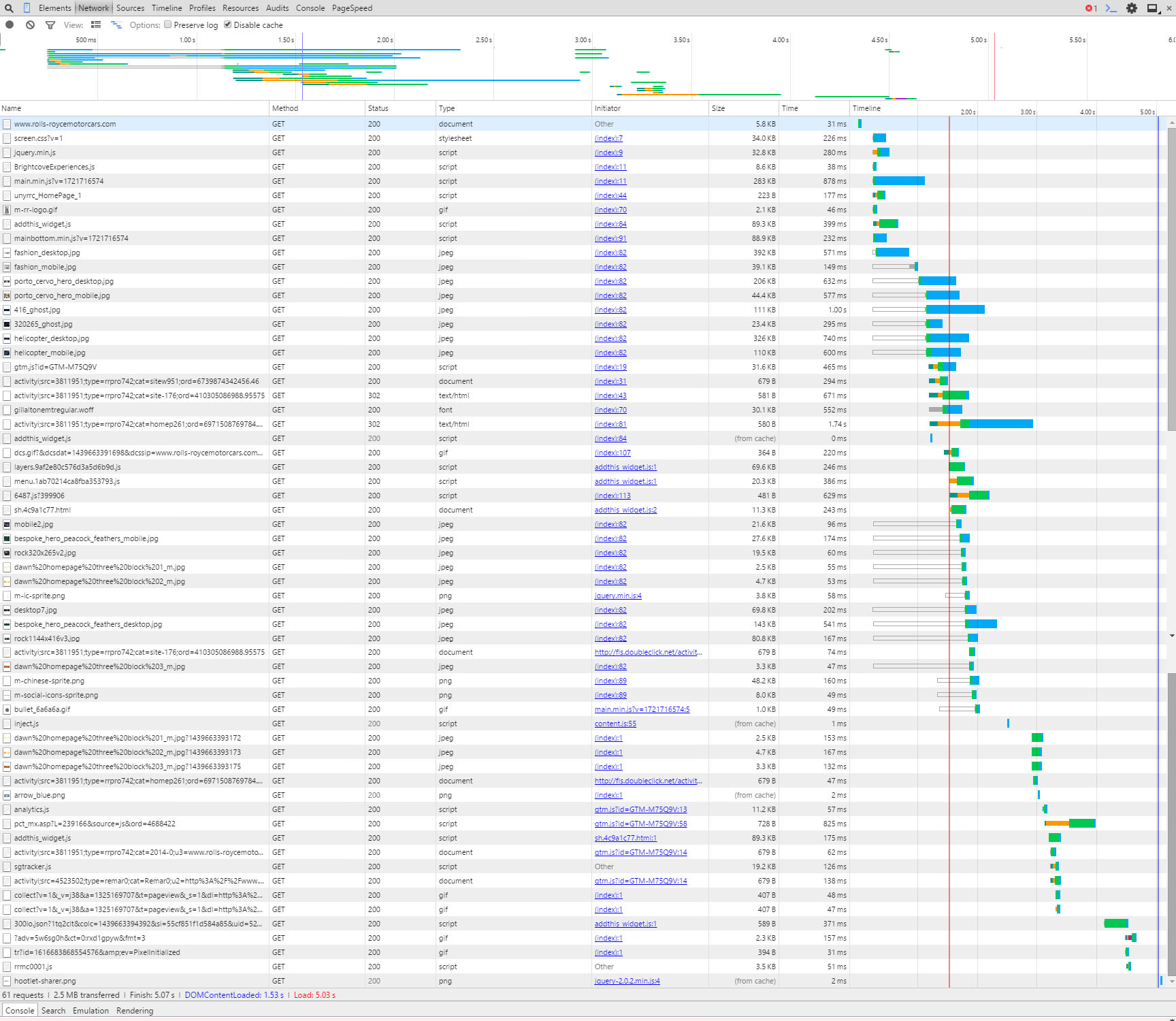
The first thing we see is that by running the refresh on the page several times it takes just under 5secs to load, ideally we would try to be nearer 3secs if possible so RR (as we are now friends with Rolls Royce I think we can call them RR) should have areas to improve.

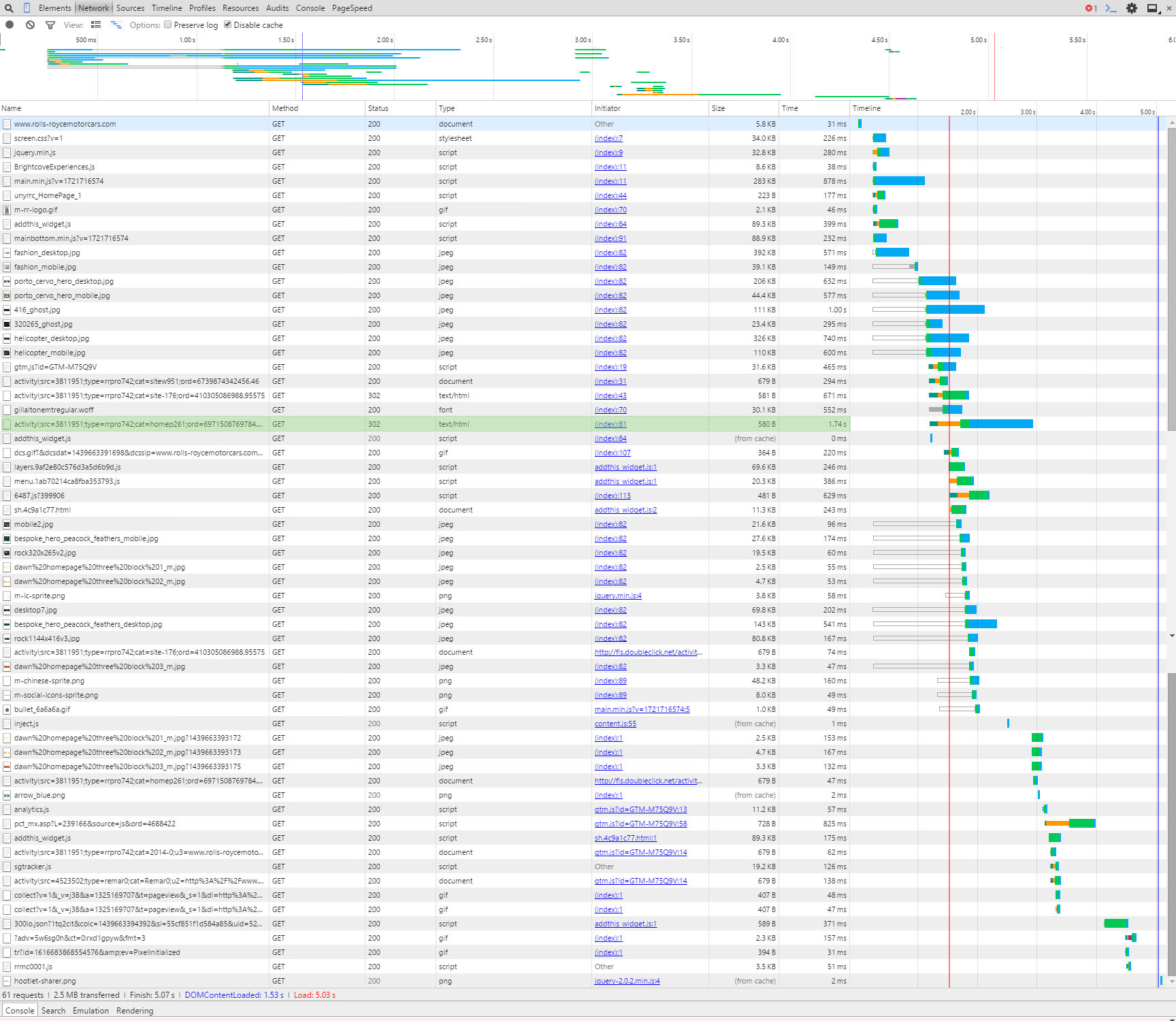
Below is a screen grab of the first initial load, you can see the bar graphs really highlighting where the time is lost.
Something to remember at this point is when a page is loading it doesn’t necessarily have to wait for the previous referenced file to load before it starts to load a new file. You can (and advised to) load multiple files at the same time. There are times you can not do this but you should try to do it as much as possible (if you want to know more about that here is a good read).


Initial load of page

Click for a larger version


This column can get quite technical which is not what this post is about, however I will mention that when you hover over the bar graph it will show a time for TTFB, this means:

Time To First Byte
Basically the time it takes to receive the first byte of data from the location (webserver). If this is high then you should speak to your hosting company to try and reduce. If they can’t help, then move to a hosting company that can!

Have a play around with the hover over the bar graph, it’s quite interesting.


Anyway back to this example, there is one line that sticks out to me, highlighted below:

Doubleclick 302 redirect

Click for a larger version


It is a link to Doubleclick.net (which is an advertising network which we assume RR are using), however it could be taking a long time to complete because it has a 302 status code in the Status column. A 302 code means that there is a redirect (temporary redirect too – another taboo but not for this post) to another page.

So to explain, if they were trying to load a file from www.rubbishwebsite.com/filelocation/ and the owners of www.rubbishwebsite.com moved the file to another location like: www.rubbishwebsite.com/new-filelocation/ they would create a redirect so you can still get to the file.
So for RR’s website to get to the data they want the request for the data from Doubleclick has to go to two locations, by changing their site so it looks at the new location it could help the speed of the page. There are other considerations to this but that is for another post, if you are performing this on your own website and see a 301 or 302 redirect we recommend updating your link.


So that is an example of using the Timeline column, the next example we will use the Name column.
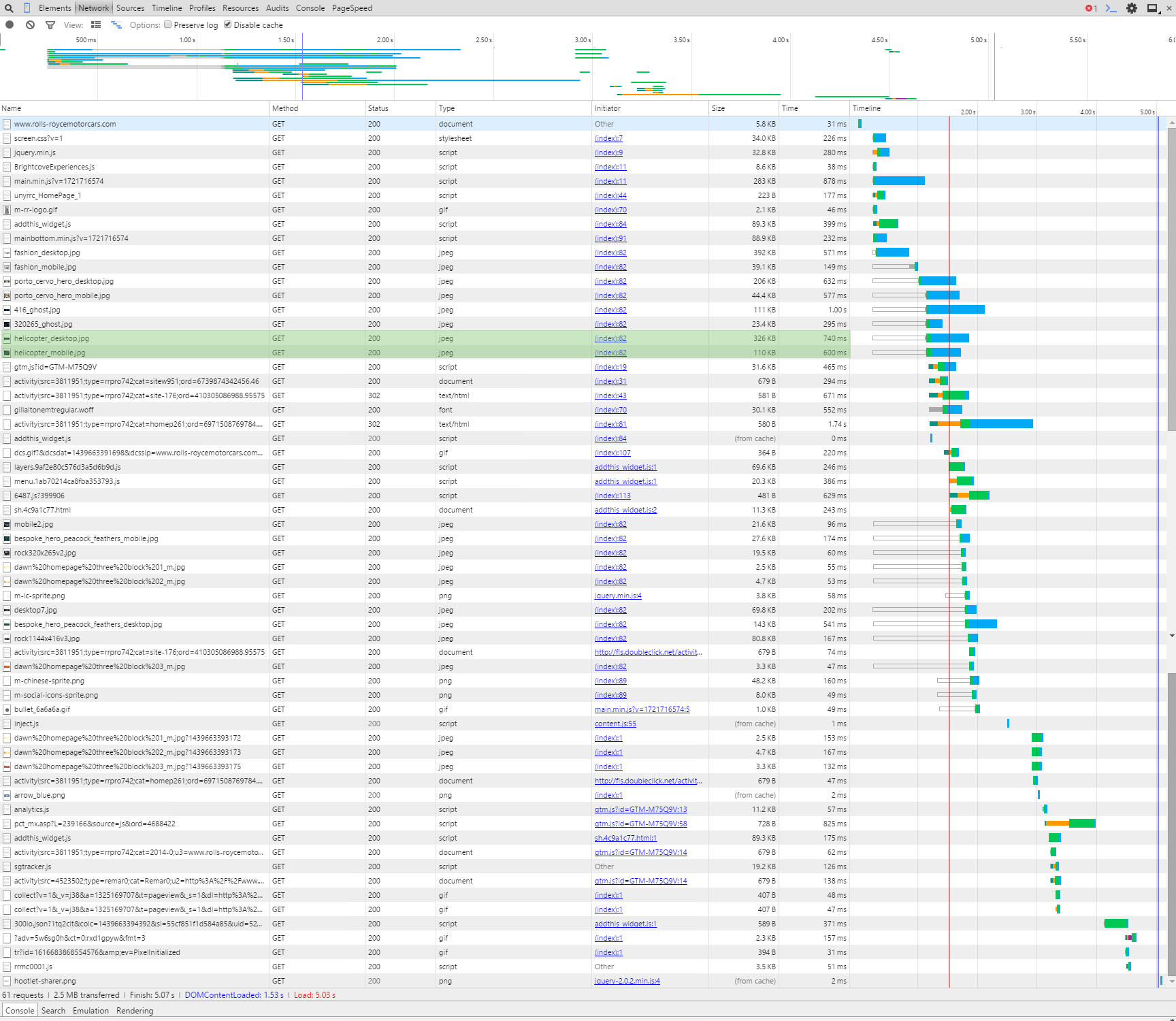
As mentioned above there are two sets of images on this website, one for desktop and the other for mobile devices. It looks like both are being loaded on mobile devices. In the screen grab below you can see the two images highlighted:

Two versions of the helicopter images

Click for a larger version


Obviously loading the correct one only would increase the speed of the page. Additionally the desktop version will be larger in size so would slow down the page load.
Whilst we are talking about images you might or might not know that there are tools that compress images so the byte size of the file is reduced. By compressing images you can save a LOT on page load times.
For example (we love our examples don’t we), the RR website uses an image called helicopter_mobile.jpg, we downloaded this file and it is 110KB, we ran the file through our image compressor and reduced it to 68.8KB, nearly half the size!! If you performed the compression to all their images alone the site would speed up considerably. Here are both the files below so you can see they look the same and there isn’t any loss in quality:


Helicopter Mobile Original
Helicopter image original
Helicopter Mobile Compressed by Juicy SEO
Helicopter image compressed
Credit of images to Rolls Royce Motor Cars, please don’t sue us for using your photos as we are only trying to help.


It’s not all doom and gloom for our best friends at RR, their server looks very quick and if they just sorted out the above it will probably be below 3secs. It just goes to show it’s not just the little businesses that need to work on their mobile websites, the big boys do too!


Now I know what needs to be changed, how do I do it?


You have now identified areas of your website which need a little attention, obviously there are many more reasons which could be slowing your webpage but I have to stop writing soon otherwise it will be tomorrow.
We will leave these to future posts where we will help tackle several of the common problems. If these future posts sound interesting to you we would love to hear from you via social media, after all feedback is the key to creating better content.
Thanks in advance!

PS: Rolls Royce a Wraith or Ghost in that nice blue would look great outside the office! 🙂

How fast does my mobile website load?

There has been a lot of talk recently about the importance of making sure your website is mobile compliant. There are several ways to make your website mobile friendly and many places on the web to learn how to do this (CLICK FOR LIST). We thought we would talk about one of the main reasons why you should make your website mobile ready and the SEO benefits.

Let’s first start with the two main reasons why to have a mobile friendly website:

  1. To ensure the visitor experience is perfect which ever device they are using.
  2. To deliver the websites content as quickly as possible to reduce the time the user has to wait as well as reducing the bandwidth used.

Today’s post we will be discussing reason number 2 and split it up into the following sections:


  • Why it is important for the user to have a mobile friendly website
  • Why it will help your website perform better, SEO wise
  • How you can find out how fast your website is by using a free tool you probably already have installed on your PC already


Why is it important to have a mobile website for the user?

At the end of the day the most important thing about your website is that it is a great experience for your visitors. If visitors to your website don’t enjoy using it or couldn’t find what they were looking for then the chances are they won’t come back. Not what anyone wants, so when a visitor is using a mobile device the experience must also be good and one way to help this is make the pages load as quickly as possible.

The world is moving very quick and online surfers patients are very short, they simply will not wait long for a page to load, they will press back button and click onto another website.

A large percentage of mobile users will not be using a free WiFi connection but their own mobile usage tariff. By delivering large unnecessary pages to small screens it will use more of the visitors tariff. Although probably not on their mind when they are surfing but a consideration anyway.


How will a mobile website help my SEO?

Not everyone knows this but search engines like Google actually have more than one search engine. There is the standard desktop version (the original if you like), another one for images and there is also a version for mobile devices.

The idea is that when using a mobile device Google’s search result will present websites that are mobile friendly and therefore help the user find what they are looking optimised for their mobile device.

If Google can provide the user with the best mobile usage experience then users will continue to use Google in the future, so it is of great interest for Google to list mobile friendly websites.

TIP: If you are having trouble ranking better than your competition for a certain keyword then maybe ensure your website has a better user experience on mobile devices and out rank them there!


How to test the mobile speed of my website?

So you know Why it is important to have a mobile website and How it will help your websites SEO, next we will explain how you can find out how fast or slow your websites pages load using a FREE tool which is probably already installed on your PC.

The great thing about this tool is that it is really easy to use and you DON’T need any technical experience. The tool we will be using in this example is Google Chrome’s Inspect Element.

First off we will assume you have the Chrome browser already installed, if you haven’t you can download from here: GOOGLE CHROME


I always think it is easier to explain things with examples so I have chosen a website which I often shop on (I wish!) Rolls Royce Motor Cars. Incidentally if anyone is looking to buy a nice car at the moment the new Rolls Royce Wraith looks very nice.


Step by step instruction on how to test your website speed on a mobile device

Navigate to your website in Chrome, once loaded either right-click and select Inspect Element or press CTRL+SHIFT+I.

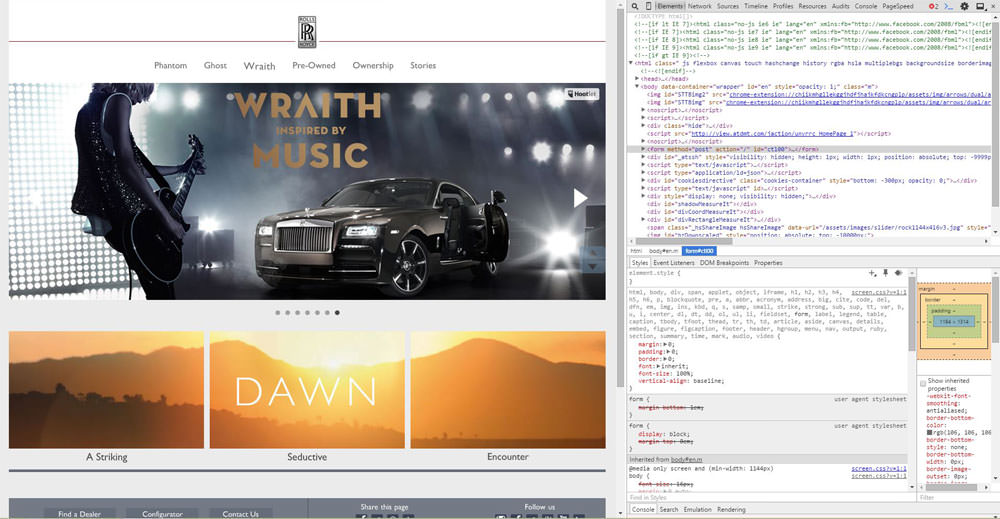
Google Chrome Inspect Element

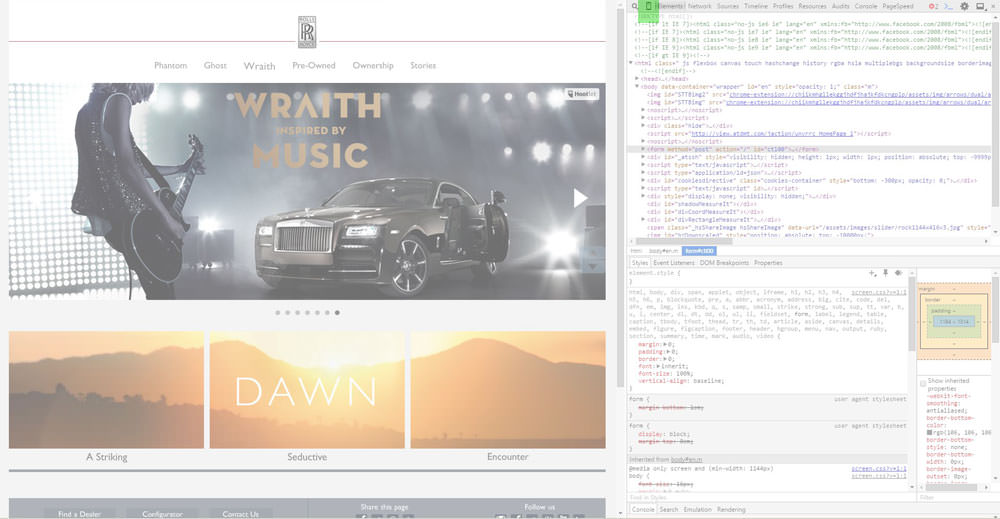
As you can see in the above image the screen is split up into two sections, on the left is the normal website and on the right it shows a section of the HTML and CSS code for that page (the default display).
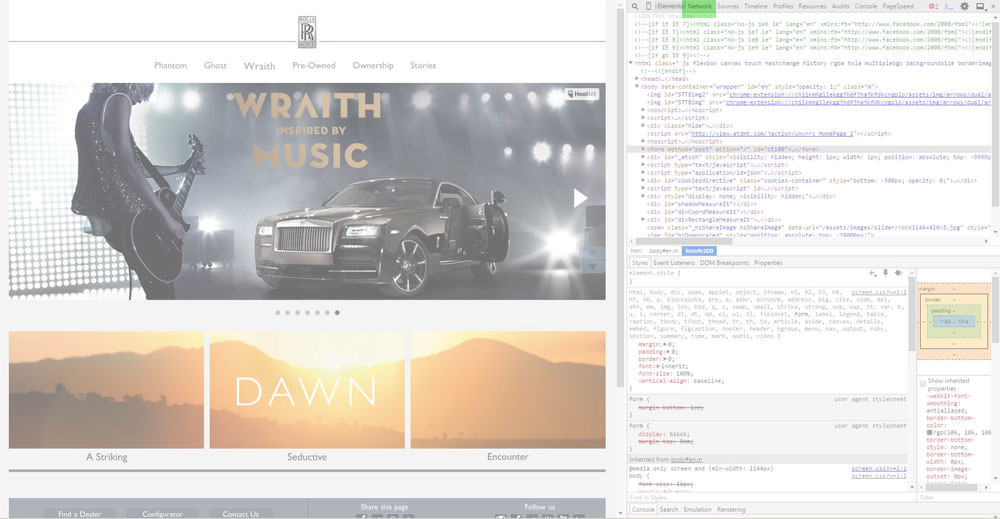
The top of the right panel has a menu with the Elements option selected as default, click on Network.

Inspect Element - Network Button
Inspect Element – Network Button

Just left of that button there is a little Mobile Phone icon button, click this button next.

Inspect Element - Mobile Button
Inspect Element – Mobile Button

Now it gets exciting!
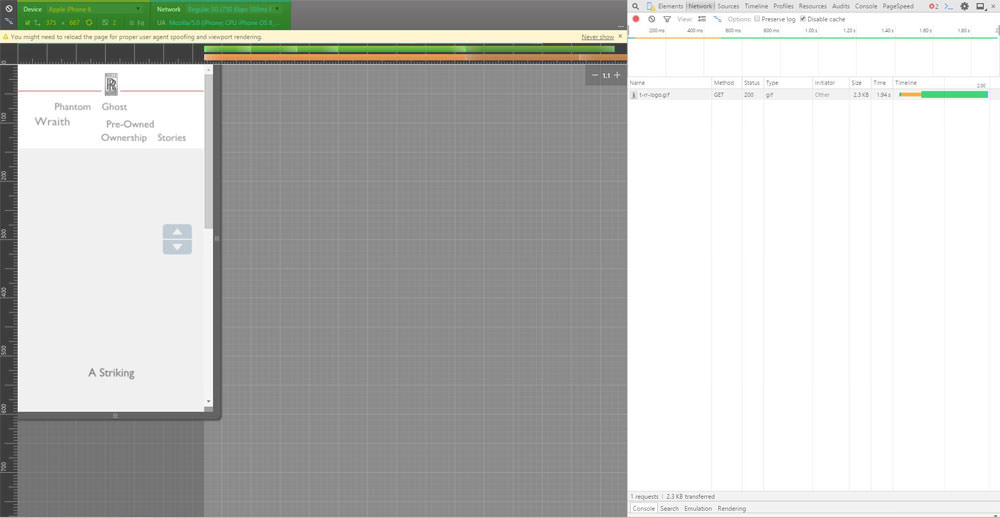
The left hand panel should have changed to a shape of a mobile device (it could be a tablet or phone as default), at the top of the left panel there are two drop-down menu options. The left hand menu is where you can choose the phone you wish this simulator to pretend it is. The menu on the right of it sets the situation the phone would be in.
So for this example we will select the popular Apple Iphone 6 whilst using a regular speed 3G network.

Inspect Element - Mobile Device Selector
Inspect Element – Mobile Device Selector

So at this point we have set up the test, now we need to clear the log and start the recording. This is done on the right hand panel at the top just under the menu previously used.
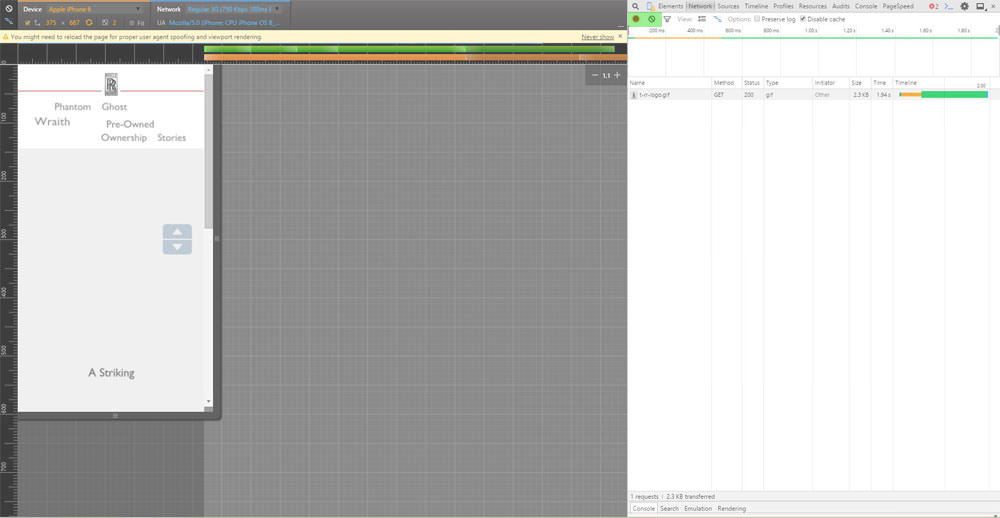
The two buttons we are interested in are the Record and the Clear buttons.

Inspect Element - Record and Clear Buttons
Inspect Element – Record and Clear Buttons

Press the record button so it is RED, which means it has started recording.
Just next to it click on the Clear button to clear the log.

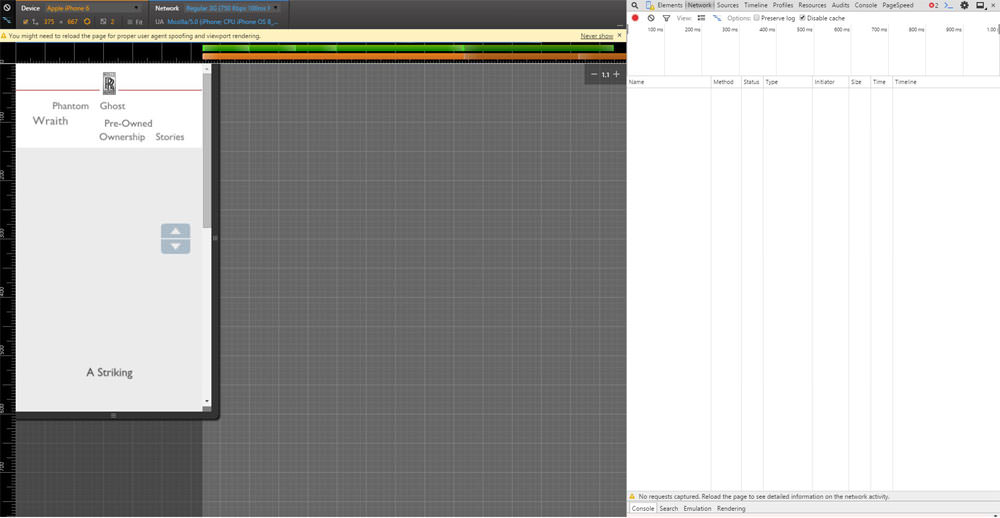
It should now look something like this.

Inspect Element - Cleared Logs
Inspect Element – Cleared Logs

Now either press F5 or click on the refresh browser page button to reload the page in this set up. You should now see the page load in the mobile phone panel on the left and see lots of lines added on the right hand panel (don’t worry too much about that now).

Inspect Element - Loaded Mobile Simulator
Inspect Element – Loaded Mobile Simulator

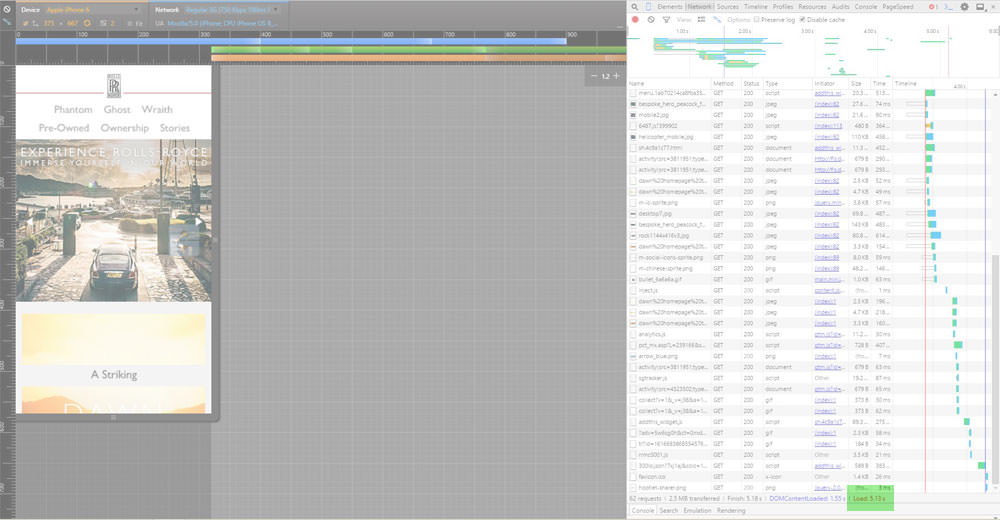
We are now waiting for the page to completely load, we will know when it is finished when there is a RED Load: ??s at the bottom (obviously the ?? would be the time it loaded the page).

Inspect Element - Page Load Speed
Inspect Element – Page Load Speed

So there we have it, you now know how long that page took to load using an Iphone6 on a regular speed mobile network. Of course there are loads of other things you can do with this Tool, we recommend you continue learning about this and head over to the How to identify why my page loads slowly page.


Juicy SEO Monthly Report Covering July 2015

Welcome to another edition of Juicy SEO’s monthly SEO report. Each month we highlight the important changes in the SEO industry which ALL webmasters, website owners and SEOs should know about. We de-clutter all the chitter-chatter about rumours and thoughts and tell you about the facts which you should act on.

So with that strong hard hitting start here is the News:

Juicy SEO 120 second Monthly SEO Report

Juicy SEO 120 second Monthly SEO Report


General SEO News:

  • The big news is about the Panda refresh (see below for Panda explanation). Panda has finally started to roll out a refresh, and about time too as we haven’t seen a refresh since late last year. If you are a regular reader of our monthly SEO report (silly you if you are not) then you know this is a long time coming! The update will take a long time however, in the past a Panda refresh would take a couple of days to complete, this time however it will take MONTHS! The reason for this is that it is updating the Panda score per page rather than per site, so it basically has to score each websites page, when you say it like that you can see why it will take months.
  • If you are thinking of making changes to your website for this refresh we think you are too late, we understand that Google has already scored each page now and they are now updating their database. That said this is version 4.2 of Panda, it would make sense you should be ready for version 4.3 if you have missed it! Lets hope it won’t be another 10 or so months (for the record we are not expecting another refresh for at least 6 months!).
  • Incidentally the Panda 4.2 refresh is for all language and country websites not just English written sites.
  • Just so you know the SEO industry didn’t know this was going to happen this month, we knew it was coming as mentioned in many of our previous reports and social media posts but we didn’t know when.


Don't forget to sign up to our SEO newsletter!

Email Address:


  • To help search engines (not just Google) find your new pages quicker and easier it is advised to submit a Sitemap.xml file for them to crawl. It is easy to do and there are lots of free plugins out there to create the file. Just sign into the search engines Webmaster Tools and add the file location. There is a Tag which can be used in the file which lets the search engines know when the page was last modified, called LastMod. In the past Google has taken this data into account. This month Google have confirmed that they no longer look at this tag.
  • Google has started sending out another bunch of messages via their Webmaster Tools site, the ones we have heard of are for Hrefland and CSS & JS blocking. If you have not received an email from Google about these it would be wise to check your Webmaster Tools account just to make sure. If you have any questions on these please contact us on either Twitter or Facebook and we will try and help out.
  • Penguin refresh (see below for Penguin explanation) is still months away, end of last year was last one. So this give you plenty of time to remove those bad links to your website.
  • Google has confirmed that they do not treat the different TLD’s  (see below for explanation) of a website any differently unless they are country specific.  If the TLD is country specific like .co.uk it will focus it more on the home market version of the search engine. Therefore if you are targeting an audience outside of your home country (international) you should look into a more international TLD.
  • In some of our previous monthly reports we have mentioned that content in Tabs which are not displayed at page open will not get the full SEO value that the tab which is defaulted to be open (see our SEO tip in May 2015 monthly report), now it looks like it has spread to the use of the CSS command ‘display: none;’. So just be a little careful with the content that is not being displayed at page load.


Increase your social following, Juicy SEO's SMM

Glossary

Panda: The Google Panda update concentrates on the quality of the web page content, if the algorithm thinks the page is of low quality it might penalise it in Google’s search results.

Penguin: Google has an algorithm called Penguin which analyses links to web pages and identifies which ones are valuable or spam links. An example of a spam link would be a paid link to your site.

Pigeon: Google’s Pigeon algorithm concentrates on Local SEO, if you have a bricks and mortar business this is something you should take note of.

TDL: A TLD means Top Level Domain like .com or .net or .co.uk.


Juicy SEO Monthly Report for June 2015

Juicy SEO’s monthly SEO report only highlights changes to the search engines which affect how websites are marketed online, every month each of the search engines make many changes to their UX or add new functionality which we do not include. This month Google made a lot of these types of changes so our report might seem like it was a quiet month for them, but it really wasn’t.

If we feel that any of these more cosmetic changes will make a difference to how people find your website we will include in future monthly SEO reports. Just a reminder that these reports are for you to get the important information you need to help your website as quick as possible.

Juicy SEO Logo


This is what has happened in the world of SEO and online marketing in June 2015:

General SEO News:

 Once again Google have said a new Panda algorithm update is coming very soon, they have been saying this for several months now but we think it will be in the next 2-3 weeks. A quick reminder the Panda algorithm value webpages on the quality of the content.

 Around the middle of June 2015 we saw some reasonably big changes in the ranking results for many sites, at first we thought the Panda update was finally here however Google have confirmed that this is not the case but just a core index refresh.

 Once again Google have confirmed that they make thousands of algorithm updates per year, this only highlights the continuous development of their search engine and the importance of making sure you are up to date with the changes.

 There has been a lot of talk once again within the SEO industry and on Google hangouts hosted by Google on the value of regular quality content on websites, this subject is here to stay folks so if you want to attract new traffic content creation is now becoming one of the main ways to do it.


Read about how to save time creating content for your site

Mobile SEO:

 IOS app indexing has now started its roll out, this is when Google will include Apps from the IOS app store within the search results when using a mobile device. When you click on the link it will take you to the already installed App on your phone or to the App store for you to download the App. This highlights the recent increase in importance for having an App in certain industries.

 Google have made a change to their Google Maps navigation, if you enter in a destination like a business or a shop and your expected arrival time falls outside the opening time of the shop or business it will show a message stating the opening hours and ask if you still wish to start the navigation. Obviously this could stop some people visiting your business as it would be closed when they get there. It is a nice idea and quite handy. However it also highlights the importance of having your correct opening hours in your Google Business account. If you are even opening later just for one week it could be worth making sure your opening hours are updated.

 Google confirmed that more people in the UK are using mobile devices to search than desktop PCs. We have mentioned this was going to happen a lot over the last few months and not at all surprised it is finally here. It also shows if you want to know what it going to happen in the future for online marketing and SEO you should make sure you read our monthly SEO report. 🙂

Don't forget to sign up to our SEO newsletter!

Email Address:

This Months SEO Tip:

Each month we like to offer up a little tip which will help your website perform better which you may not know about or just forgotten about it.
A trend which we feel will just continue is people using YouTube to find the answer to their questions. After all YouTube is actually a search engine in its own right so why not? An interesting statistic has been published recently, YouTube “How To” video searches  are up by 70% with over 100 million hours watched in 2015 so far. If you are in an industry where you can create one or more “How To” video(s) then it might be time to get out your cine-camera!


If you missed last month’s report don’t worry, all the information is still relevant and available in May’s SEO monthly update report.


Why is using Google’s Adwords Tools bad for SEO?

Google provide many tools to help business owners and webmasters manage their websites, this includes a set of tools to help manage their pay per click (PPC) Adwords campaigns.
Although these tools are designed to be used with your Adwords accounts many SEO companies use some of them to help with their organic keyword targeting. There isn’t anything wrong with this and in fact we recommend using some of them, after all if Google are providing you with data about keyword relavence you would be mad not to use it!

So why the negative title to this blog post then?


Google Adwords Good for PPC not for SEO


Google’s keyword tools do provide some useful data, like how competitive a keyword is but you must remember that the tool is providing results for paid search not organic search results.

A good example of this is their ‘Keyword Ideas‘ tool, the idea of this tool is to help generate keywords that you may have not thought of. However the results from this tool tend to be focused on commercial keywords, things like ‘buy dog mints‘ or ‘ski apartments to rent‘. If you wish to target non commercial keywords this tool might not help you too much.

Something that the Adwords tools are useful for is to give you an idea how many times a keyword is searched. The figures are far from exact but if you are deciding between several keywords to target this tool can help by letting you know which is searched more. As mentioned above you can’t use the Keyword Ideas section for this but if you enter in the keywords manually you should get the data you are after.

So if you can’t rely on Google’s Adwords tools to help find new keywords, what can you use?

Here are two good FREE ways to get some keyword ideas to target.


Predictive Searches

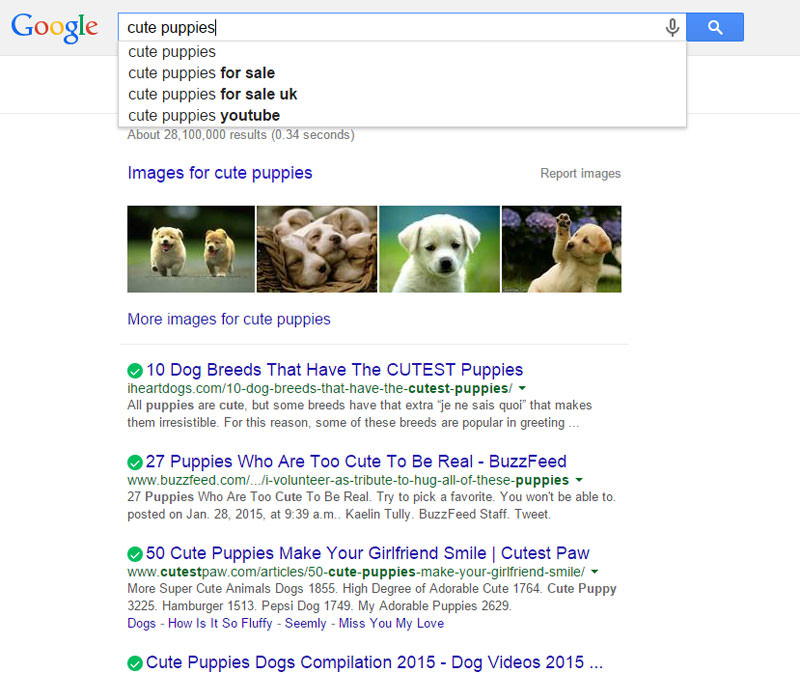
When using Google, as you type in their search bar Google often ‘guesses’ what you are going to write and lists several common used searches. This is a very handy way of finding new and commonly used multi-word keyword phrases.


Google Predictive Search


Read about how to save time creating content for your site

Related Searches

If you search for your keyword in Google, scroll to the bottom of the screen and you will find a section called ‘Related Searches‘, here you will be able to find more keyword suggestions which have been used or are commonly used and are somehow connected to your entered in keyword.


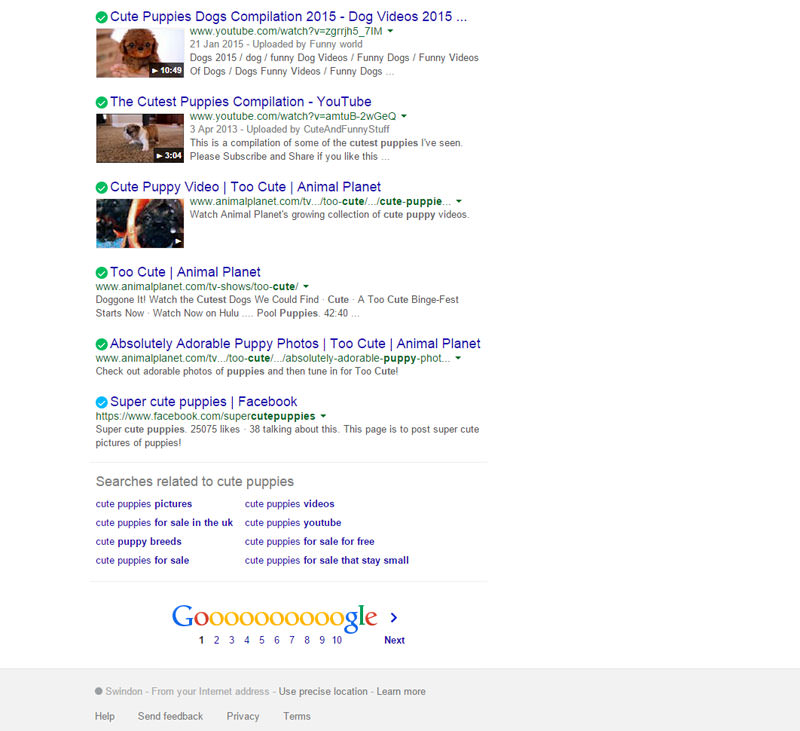
Google Related To Search Results


So Google’s Adwords does provide some useful data for SEO but you must remember it is for paid search results so could be providing incorrect data for organic searches.


Juicy SEO Monthly Report for May 2015

Keeping up with the goings on in the world of online marketing and in particular SEO can be quite draining and very time consuming. But never fear as we have once again squished all the important news and changes from Google and the other search engines into our quick and easy 5 min SEO Monthly Update Report.

If you have not read one of our monthly SEO reports before they are designed to be short and to the point so you can be informed with the most important changes made by the search engines so you can help your website perform better. So we hope you enjoy and don’t forget to read our previous monthly reports as they are still relevant in our Search Engine News section.

This is what has happened in May 2015:

General SEO News:

  • Google confirmed that they have a new Quality Update algorithm which helps rate the quality of the content on a webpage. If you thought that is what Google’s Panda algorithm does then head over here to our Google’s Quality Update post to understand more on this. Content has always been King, now quality is the Queen!
  • If you are currently using Twitter here is some good news, Twitter feeds are now included into Google’s search engine results. These are mainly trending tweets but we have also seen many local based Tweets too. If you are not already actively using Twitter this news should highlight the importance of this social network for online businesses. To find out more on this head over to our Social Media Management page.
  • One of the important ways to help search engines know of new content is by making sure your sitemap.xml is up to date and submitted to all search engines. The sitemap.xml file has a couple of parameters which are called Priority and Change Frequency. In the past webmasters have used (and abused) these parameters to help certain content get more priority. Google have confirmed that they no longer use this two parameters.
  • Lots of rumours about Apple creating their own search engine, this would (most likely) only be for mobile devices if they do indeed create one. It would also replace Google and Bing one would think too. We all want another search engine to worry about don’t we! 🙂
  • Websites with Doorway Pages have been hit over the last week or so and their ranking positions have taken a slide. To remind you a Doorway page is if you have say 300 pages with the same content for 300 towns but only a few words have changed, namely the town names. Ie: Bristol Taxis, Essex Taxis, Birmingham Taxis etc… The reason they would do this is to try and target local based keyword terms.
    If you are doing this or intend to do so soon, then we have one word for you, STOP! 🙂


Increase your social following, Juicy SEO's SMM

Panda News:

The Google Panda update concentrates on the quality of the web page, if the algorithm thinks the page is of low quality it might penalise it in Google’s search results.

  • A little news on Penguin and Panda, Google in their own vague manor have said they will run the updates for these two algorithms faster. Helpful!

Penguin News (including link building):

Google has an algorithm called Penguin which analyses links to web pages and identifies which ones are valuable or spam links. An example of a spam link would be a paid link to your site.

  • As above.

Pigeon News:

Google’s Pigeon algorithm concentrates on Local SEO, if you have a bricks and mortar business this is something you should take note of.

  • Lots of movement over the last couple of weeks with local based search terms, we are not sure if there was a bug or if Google are testing something, however everything now seems to be back to normal and how it was beforehand.

Mobile SEO:

  • Bing have announced that they too are rolling out a mobile algorithm similar to Google’s recent addition (link to Google’s mobile algorithm post). Bing’s will be a little different in that if a website is designed mobile friendly it will not get a ranking boost on mobile devices (like Google), Bing will continue to show the most relevant search results for the search term mobile friendly or not. They will have a ‘Mobile Friendly‘ label next to the website link though. More on this to come.
  • This is exciting news if your business has an App. Google have now started to include Apps within mobile search results. It is called App indexing and it works like this. If you search for say Cake Recipes on a mobile device it might include an App with lots of Cake Recipes. If you click on the link it will either open the App on your mobile device or take you to a page to download the App.
    Bing have also said they will be rolling this out too soon. It works both for Android and IOS.
    There is a lot of movement in App indexing so expect more on this in the future.
  • Google have been testing a badge in their search results called SLOW. The idea is to identify sites that are slow to load. We haven’t seen this ourselves but several people in the SEO industry have. If this is rolled out it wouldn’t look good next to your website in the search results! (a link to find out how to increase the speed of your website)


This Months SEO Tip:

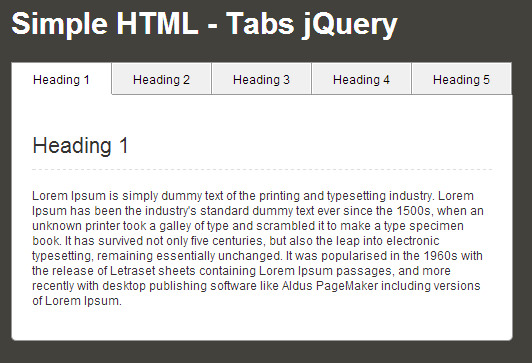
A popular way of displaying a lot of content on a page is to use tabs (often JavaScript or HTML). An example of one below:


Example of Tabs


Google have said that if you have a website that uses these tabs or similar ways of hiding content it will not value the content on the hidden tabs as much as the initial open tab. Therefore make sure your important primary keyword friendly content is in the initial opened tab.


If you missed last month’s report don’t worry, all the information is still relevant and available in April’s SEO monthly update report.


Google’s Quality Update – NEW!

There has been a lot of speculation since the start of May that one or more of Google’s algorithms has had an update. The reason is that there has been a lot unusual ranking movements over the last few weeks which were not expected, out of the ordinary.

Initially it was thought to be a Panda algorithm update as it looked to target websites with low quality content. However Google have recently confirmed that it wasn’t an algorithm update at all but the introduction of their Quality Update Algorithm (it has been called the Phantom Update in the past too).

So what’s the difference?


The difference between the new Quality Update and Google’s Panda update

Lets start off with a quick reminder that Google has an algorithm called Panda which analyses the quality of the content on webpages and penalises them if they deem the quality of the content is thin or of low quality. Panda is meant to run around once a month which when ran can change a large percentage of ranking positions for lots of websites. That said though we haven’t seen a Panda update since October 2014.

This new Quality Update Algorithm doesn’t penalise webpages but in fact the complete opposite, it rewards webpages which have good content. This (we think) is a first for Google actually rewarding websites for good work! Could this be the way the search engine is going to go in the future, reward instead of penalise? We will see…

That said the results of the Quality Update Algorithm and Panda are very similar, websites with good content get ranked better than websites with poor content.


Increase your social following, Juicy SEO's SMM

Something else which is interesting about this update is that it only affects the page rather than the whole website, so if you have a 10 page website and only 1 page has good content then 9 pages will not get a ranking pat on the back. This should ensure that the content across the website is of better quality. It also means you can look at the pages that are not performing well and work on the content to help it out.

Google

As mentioned above when Panda actually runs it updates in one big change, this new Quality Update Algorithm is different as it is continuously running so we shouldn’t see big movements now from it. The UP side of this means if your website has poor quality and you spend a bit of time and make it superb you don’t need to wait until an algorithm update to run to see the rewards.

So you can make the changes to your webpage and wait a few days for Google to crawl your website, or you could use Google Webmaster Tools (or Google Search Console as it is now called) to ask them to re-crawl your site. You should be able to see if it has made any difference very quickly, this is great for A/B testing!

Over the last few months we have seen some big changes in Google, with Google’s Mobile Algorithm update and the advantages of having HTTPS secure servers even though they didn’t make much of a difference in the end. Maybe Google are making these changes for a longer term goal??

So the “Take Home” from this is:

Make sure every important page of your site has unique quality content


Smartphones are now more popular than desktop computers

Some interesting news came out of Google this week which if you have been reading our SEO blogs and social media posts you won’t be too shocked to hear. Google have confirmed that they are now serving more searches on smartphones than on desktop computers. I guess this also coincides with the reduction in desktop computer sales over the last few years too.
Although they only say the stats are for 10 countries however they do include USA and Japan, as the UK often follows the US a few months later expect (if it isn’t already) this to be the same here.

What is also interesting is that when Google record these stats they bundle up users of Tablet users with those of Desktop users, therefore this means at least half of all searches (in the tested countries) are now using a smartphone.
This is an huge increase even from the stats of 2014 which could be as much a double the amount of smartphone users.

Google Mobile Friendly Search


Google are and will continue (we suspect) to change their user interface of their products to be aimed at smartphone users. They are currently rolling out smartphone optimised advert formats via their Adwords network, this will increase the number of smartphone clicks on adverts.

This news is very important for website owners, with the recent Google Mobile algorithm update it is very important to have a mobile friendly website as Google will be “recommending” mobile friendly websites more.

If you would like to read the statement from Google about their Adwords change for mobile users here is the link.