How to identify why my page loads slowly

Today’s post we will be identifying why website pages are slow to load on mobile devices.
We all know how important having a mobile website for today’s internet users and one of the biggest issue website owners have is trying to speed up the load time of the page.

In this post we will try and help identify areas which you can try on your own website using a completely FREE tool which is probably already on your computer. This is Google Chrome Inspect Element.

If you haven’t already we recommend that you first read our post How fast does my mobile website load? before continuing as we will continue on from the end of that post.
….go on then quickly go and read that post, we will wait for you here.

Done?!
Great, welcome back!


So we will continue to use the previous website example of Rolls Royce Motor Cars and see if we can identify areas which will help their homepage load quicker on a mobile device.

Sections of the Inspect Element Panel

In this post we will be concentrating on the Network menu option in Inspect Element and will focus on the main areas of this panel. There is so much you can get out of this tool it would make this post too long if we explained them all. We will only use the columns which will get us the important information quickly.

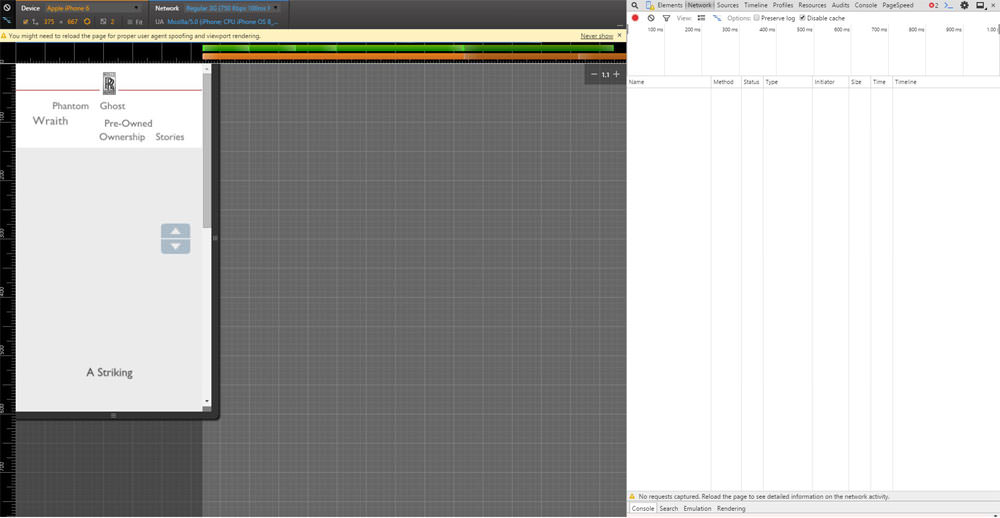
We will not be needing the left hand panel which shows the website in a mobile device any more so we will concentrate on the right hand panel from now on. However please make sure the left hand panel is set to Apple Iphone6 (just because it is a popular phone) and No Throttling in the Network setting.
Below we will explain what each of the important columns are and how you can use them to help find areas of your website which is slowing down your page from loading.

Column: Name

A website page is made up of many many lines of code, some of the code references other files on your or someone else’s webservers like an image or some JavaScript which manages your Navigation for example. As the page is created it goes through the code line by line to build up the page, in this column you can see each of the files names referenced in order to build the page.

Column: Status

When a page is loaded or a file is referenced there are several states that reference could make. For example if the reference was successful it would create a status code of 200. Another example would be if the reference couldn’t find the file as it is no longer at that location it would produce a 404 status code.

These codes help to provide you with useful clues to why the page it taking a long time to load. After all there isn’t any reason to go looking for some code which is know longer there!

Column: Type

This column tells you the type of file referenced, it could be a jpeg image, a script written in JavaScript or a font file. This is helpful as you can tell if the file is important to the page and experience will tell you that the file might be large and you should pay attention to it.

Column: Size

The all important Size column, as you can probably guess this tells us how big the file is in bytes, if you see a page trying to load a 10Mb image on a mobile device it should send you a pretty big signal something needs to change!

Column: Time

This column shows how long each file referenced took to load, so another very useful column.

Column: Timeline

This is the first column I tend to start with, it is a waterfall of the page loading and can identify long loading files quickly. It is shown in a bar graph type display, when you hover over the bar it provides you with further useful information.


Performing a speed test on a mobile device


Ok so lets perform a test now on Rolls Royce’s website and see if we can find anything to help them out.
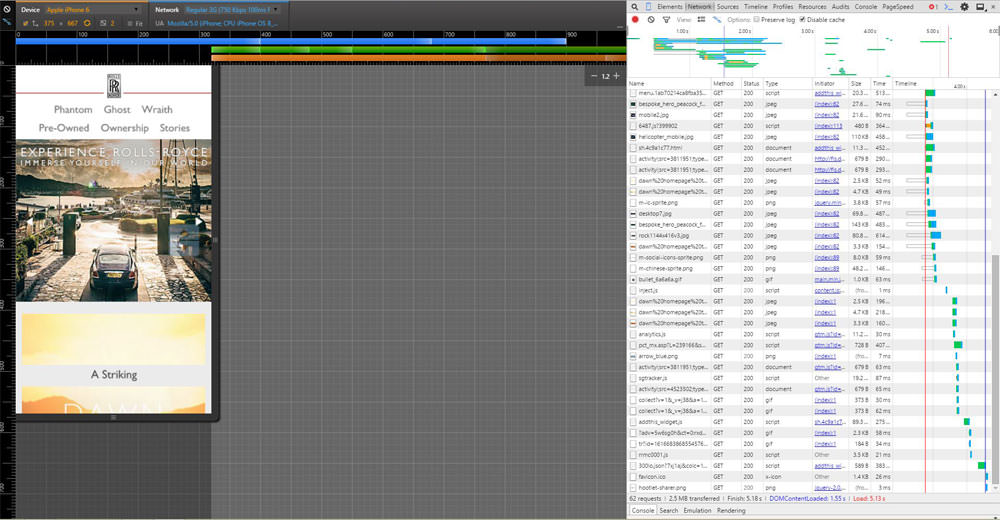
The first thing we see is that by running the refresh on the page several times it takes just under 5secs to load, ideally we would try to be nearer 3secs if possible so RR (as we are now friends with Rolls Royce I think we can call them RR) should have areas to improve.

Below is a screen grab of the first initial load, you can see the bar graphs really highlighting where the time is lost.
Something to remember at this point is when a page is loading it doesn’t necessarily have to wait for the previous referenced file to load before it starts to load a new file. You can (and advised to) load multiple files at the same time. There are times you can not do this but you should try to do it as much as possible (if you want to know more about that here is a good read).
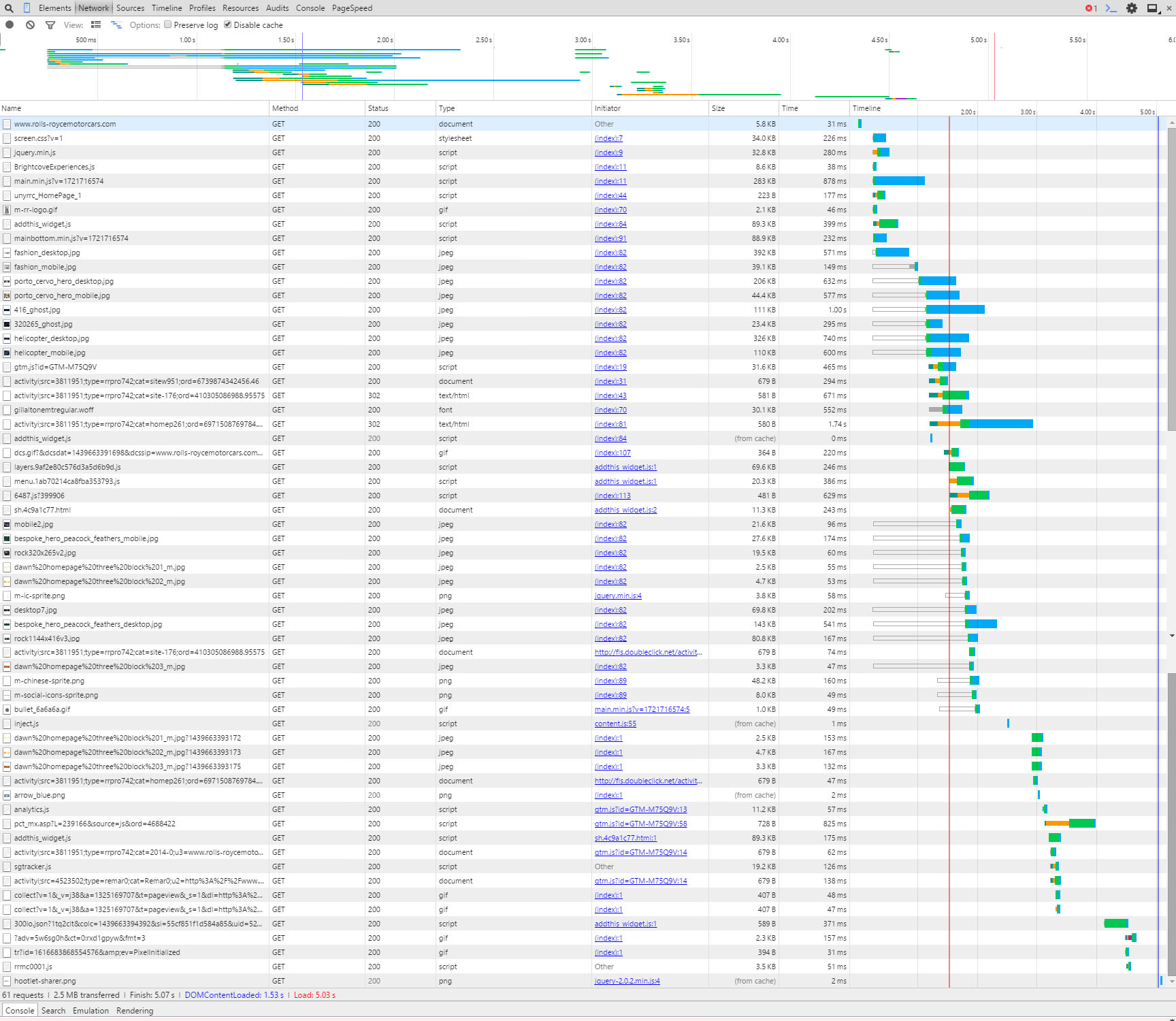
 

Initial load of page

Click for a larger version


This column can get quite technical which is not what this post is about, however I will mention that when you hover over the bar graph it will show a time for TTFB, this means:

Time To First Byte
Basically the time it takes to receive the first byte of data from the location (webserver). If this is high then you should speak to your hosting company to try and reduce. If they can’t help, then move to a hosting company that can!

Have a play around with the hover over the bar graph, it’s quite interesting.


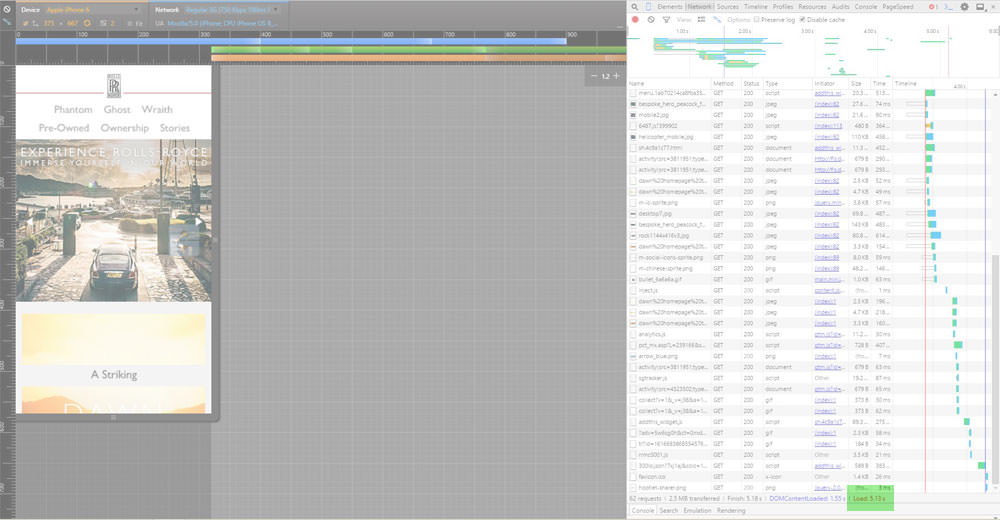
Anyway back to this example, there is one line that sticks out to me, highlighted below:
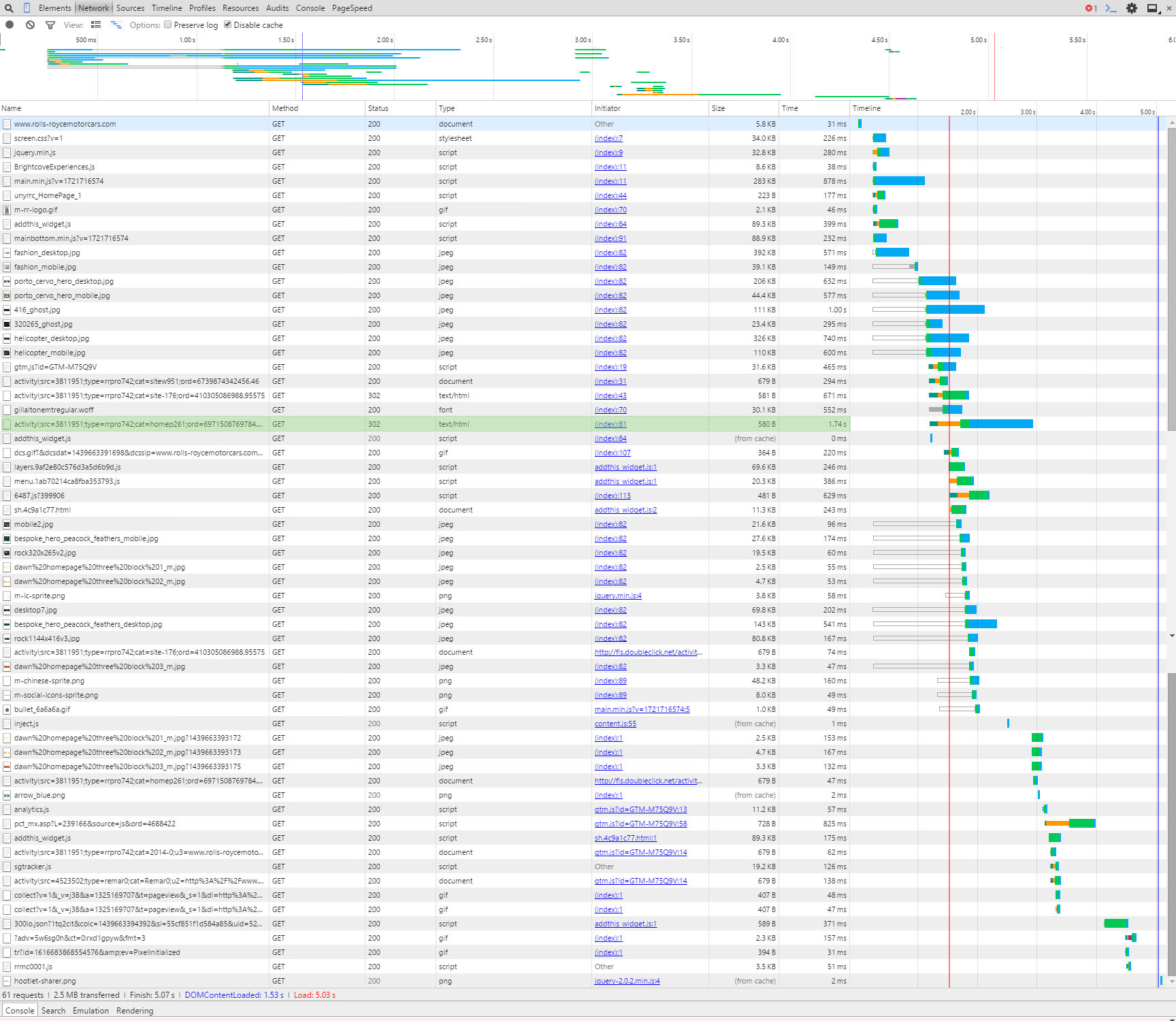
Doubleclick 302 redirect

Click for a larger version


It is a link to Doubleclick.net (which is an advertising network which we assume RR are using), however it could be taking a long time to complete because it has a 302 status code in the Status column. A 302 code means that there is a redirect (temporary redirect too – another taboo but not for this post) to another page.

So to explain, if they were trying to load a file from www.rubbishwebsite.com/filelocation/ and the owners of www.rubbishwebsite.com moved the file to another location like: www.rubbishwebsite.com/new-filelocation/ they would create a redirect so you can still get to the file.
So for RR’s website to get to the data they want the request for the data from Doubleclick has to go to two locations, by changing their site so it looks at the new location it could help the speed of the page. There are other considerations to this but that is for another post, if you are performing this on your own website and see a 301 or 302 redirect we recommend updating your link.


So that is an example of using the Timeline column, the next example we will use the Name column.
As mentioned above there are two sets of images on this website, one for desktop and the other for mobile devices. It looks like both are being loaded on mobile devices. In the screen grab below you can see the two images highlighted:
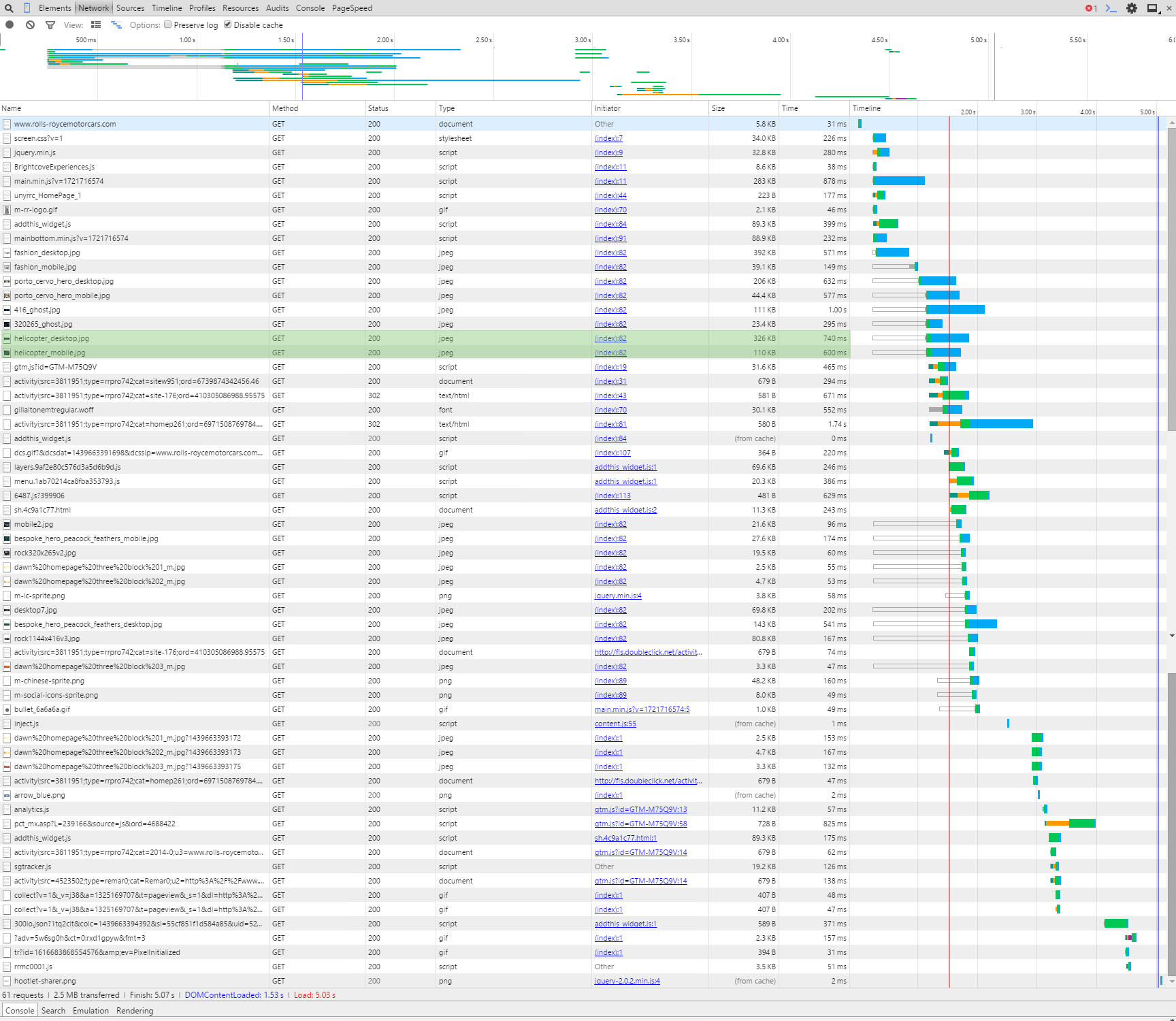
Two versions of the helicopter images

Click for a larger version


Obviously loading the correct one only would increase the speed of the page. Additionally the desktop version will be larger in size so would slow down the page load.
Whilst we are talking about images you might or might not know that there are tools that compress images so the byte size of the file is reduced. By compressing images you can save a LOT on page load times.
For example (we love our examples don’t we), the RR website uses an image called helicopter_mobile.jpg, we downloaded this file and it is 110KB, we ran the file through our image compressor and reduced it to 68.8KB, nearly half the size!! If you performed the compression to all their images alone the site would speed up considerably. Here are both the files below so you can see they look the same and there isn’t any loss in quality:


 

Helicopter Mobile Original
Helicopter image original
Helicopter Mobile Compressed by Juicy SEO
Helicopter image compressed
Credit of images to Rolls Royce Motor Cars, please don’t sue us for using your photos as we are only trying to help.


It’s not all doom and gloom for our best friends at RR, their server looks very quick and if they just sorted out the above it will probably be below 3secs. It just goes to show it’s not just the little businesses that need to work on their mobile websites, the big boys do too!


Now I know what needs to be changed, how do I do it?


You have now identified areas of your website which need a little attention, obviously there are many more reasons which could be slowing your webpage but I have to stop writing soon otherwise it will be tomorrow.
We will leave these to future posts where we will help tackle several of the common problems. If these future posts sound interesting to you we would love to hear from you via social media, after all feedback is the key to creating better content.
Thanks in advance!

PS: Rolls Royce a Wraith or Ghost in that nice blue would look great outside the office! 🙂
How fast does my mobile website load?

There has been a lot of talk recently about the importance of making sure your website is mobile compliant. There are several ways to make your website mobile friendly and many places on the web to learn how to do this (CLICK FOR LIST). We thought we would talk about one of the main reasons why you should make your website mobile ready and the SEO benefits.

Let’s first start with the two main reasons why to have a mobile friendly website:

  1. To ensure the visitor experience is perfect which ever device they are using.
  2. To deliver the websites content as quickly as possible to reduce the time the user has to wait as well as reducing the bandwidth used.

Today’s post we will be discussing reason number 2 and split it up into the following sections:


  • Why it is important for the user to have a mobile friendly website
  • Why it will help your website perform better, SEO wise
  • How you can find out how fast your website is by using a free tool you probably already have installed on your PC already


Why is it important to have a mobile website for the user?

At the end of the day the most important thing about your website is that it is a great experience for your visitors. If visitors to your website don’t enjoy using it or couldn’t find what they were looking for then the chances are they won’t come back. Not what anyone wants, so when a visitor is using a mobile device the experience must also be good and one way to help this is make the pages load as quickly as possible.

The world is moving very quick and online surfers patients are very short, they simply will not wait long for a page to load, they will press back button and click onto another website.

A large percentage of mobile users will not be using a free WiFi connection but their own mobile usage tariff. By delivering large unnecessary pages to small screens it will use more of the visitors tariff. Although probably not on their mind when they are surfing but a consideration anyway.


How will a mobile website help my SEO?

Not everyone knows this but search engines like Google actually have more than one search engine. There is the standard desktop version (the original if you like), another one for images and there is also a version for mobile devices.

The idea is that when using a mobile device Google’s search result will present websites that are mobile friendly and therefore help the user find what they are looking optimised for their mobile device.

If Google can provide the user with the best mobile usage experience then users will continue to use Google in the future, so it is of great interest for Google to list mobile friendly websites.

TIP: If you are having trouble ranking better than your competition for a certain keyword then maybe ensure your website has a better user experience on mobile devices and out rank them there!


How to test the mobile speed of my website?

So you know Why it is important to have a mobile website and How it will help your websites SEO, next we will explain how you can find out how fast or slow your websites pages load using a FREE tool which is probably already installed on your PC.

The great thing about this tool is that it is really easy to use and you DON’T need any technical experience. The tool we will be using in this example is Google Chrome’s Inspect Element.

First off we will assume you have the Chrome browser already installed, if you haven’t you can download from here: GOOGLE CHROME


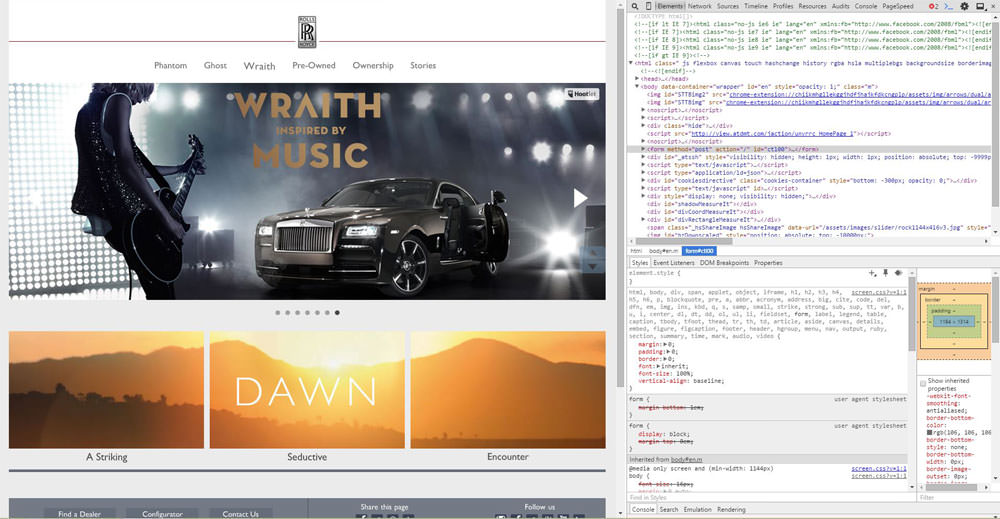
I always think it is easier to explain things with examples so I have chosen a website which I often shop on (I wish!) Rolls Royce Motor Cars. Incidentally if anyone is looking to buy a nice car at the moment the new Rolls Royce Wraith looks very nice.


Step by step instruction on how to test your website speed on a mobile device

Navigate to your website in Chrome, once loaded either right-click and select Inspect Element or press CTRL+SHIFT+I.

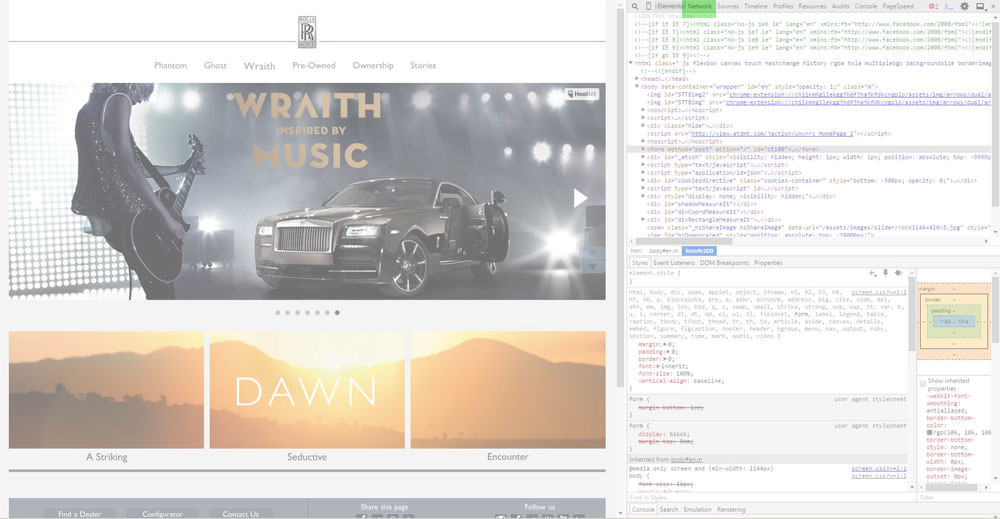
Google Chrome Inspect Element

As you can see in the above image the screen is split up into two sections, on the left is the normal website and on the right it shows a section of the HTML and CSS code for that page (the default display).
The top of the right panel has a menu with the Elements option selected as default, click on Network.

Inspect Element - Network Button
Inspect Element – Network Button

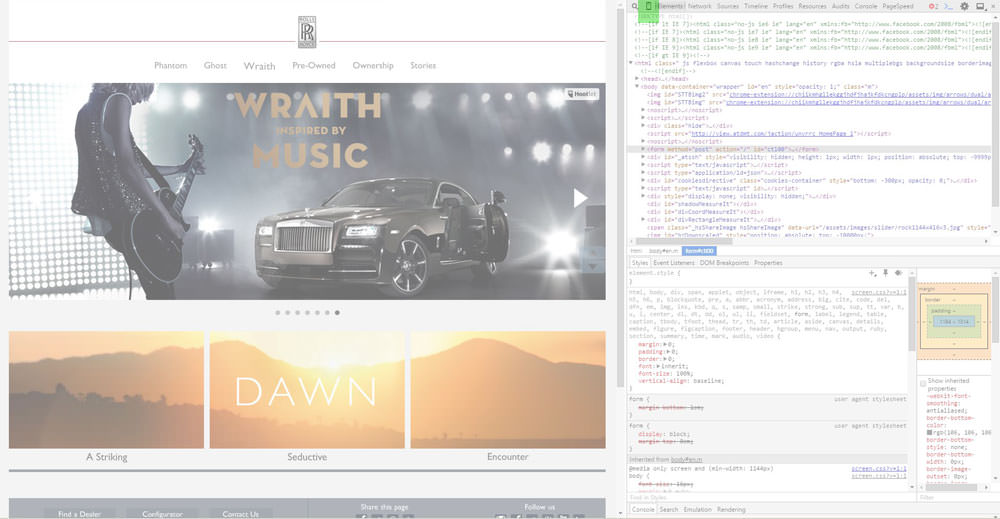
Just left of that button there is a little Mobile Phone icon button, click this button next.

Inspect Element - Mobile Button
Inspect Element – Mobile Button

Now it gets exciting!
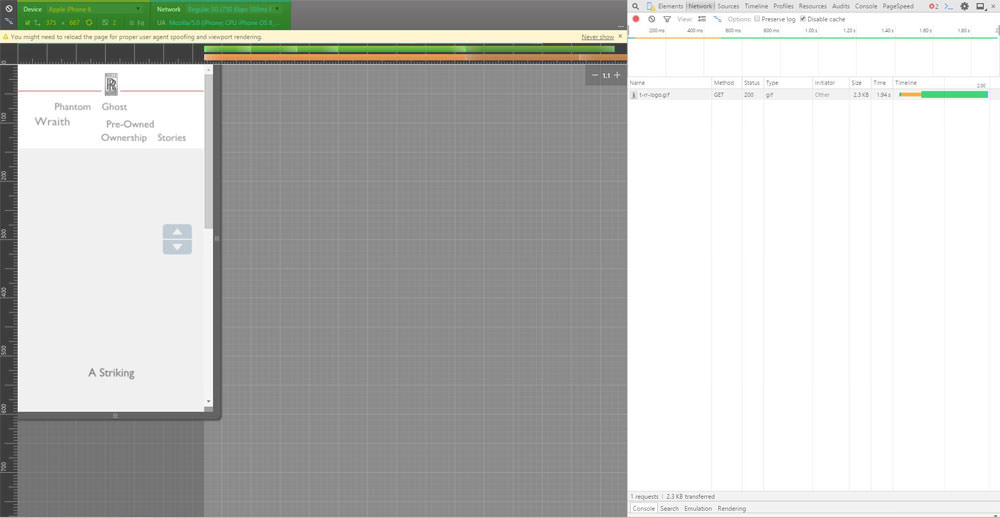
The left hand panel should have changed to a shape of a mobile device (it could be a tablet or phone as default), at the top of the left panel there are two drop-down menu options. The left hand menu is where you can choose the phone you wish this simulator to pretend it is. The menu on the right of it sets the situation the phone would be in.
So for this example we will select the popular Apple Iphone 6 whilst using a regular speed 3G network.

Inspect Element - Mobile Device Selector
Inspect Element – Mobile Device Selector

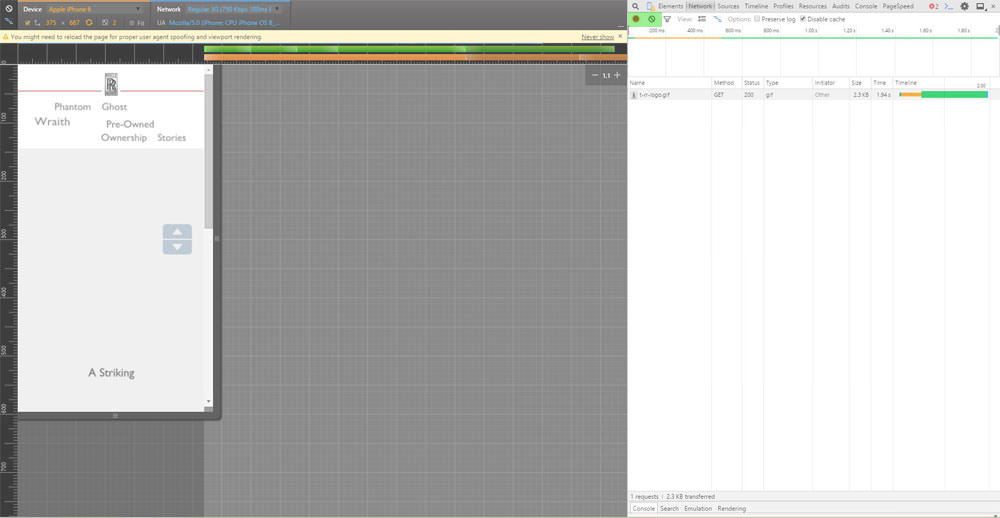
So at this point we have set up the test, now we need to clear the log and start the recording. This is done on the right hand panel at the top just under the menu previously used.
The two buttons we are interested in are the Record and the Clear buttons.

Inspect Element - Record and Clear Buttons
Inspect Element – Record and Clear Buttons

Press the record button so it is RED, which means it has started recording.
Just next to it click on the Clear button to clear the log.

It should now look something like this.

Inspect Element - Cleared Logs
Inspect Element – Cleared Logs

Now either press F5 or click on the refresh browser page button to reload the page in this set up. You should now see the page load in the mobile phone panel on the left and see lots of lines added on the right hand panel (don’t worry too much about that now).

Inspect Element - Loaded Mobile Simulator
Inspect Element – Loaded Mobile Simulator

We are now waiting for the page to completely load, we will know when it is finished when there is a RED Load: ??s at the bottom (obviously the ?? would be the time it loaded the page).

Inspect Element - Page Load Speed
Inspect Element – Page Load Speed

So there we have it, you now know how long that page took to load using an Iphone6 on a regular speed mobile network. Of course there are loads of other things you can do with this Tool, we recommend you continue learning about this and head over to the How to identify why my page loads slowly page.


Smartphones are now more popular than desktop computers

Some interesting news came out of Google this week which if you have been reading our SEO blogs and social media posts you won’t be too shocked to hear. Google have confirmed that they are now serving more searches on smartphones than on desktop computers. I guess this also coincides with the reduction in desktop computer sales over the last few years too.
Although they only say the stats are for 10 countries however they do include USA and Japan, as the UK often follows the US a few months later expect (if it isn’t already) this to be the same here.

What is also interesting is that when Google record these stats they bundle up users of Tablet users with those of Desktop users, therefore this means at least half of all searches (in the tested countries) are now using a smartphone.
This is an huge increase even from the stats of 2014 which could be as much a double the amount of smartphone users.

Google Mobile Friendly Search


Google are and will continue (we suspect) to change their user interface of their products to be aimed at smartphone users. They are currently rolling out smartphone optimised advert formats via their Adwords network, this will increase the number of smartphone clicks on adverts.

This news is very important for website owners, with the recent Google Mobile algorithm update it is very important to have a mobile friendly website as Google will be “recommending” mobile friendly websites more.

If you would like to read the statement from Google about their Adwords change for mobile users here is the link.


Mobilegeddon is here! Save the World!

Mobliegeddon, it’s a great word isn’t it?
It sounds like the world is going to end for mobiles or something, very dramatic!

However this is not going to happen so you can relax in the knowledge you will still be able to play Candy Crush on your tablet.
In fact ‘Mobilegeddon’ has been used to name the launch of a new algorithm from Google which ranks websites which are designed for mobile devices better than websites which are not. This will only affect searches using Google’s mobile search facility (ie: using Google from a mobile device).
The new algorithm was launched on 21st April 2015 and Google have said it will take a week to completely roll it out.

This isn’t something they have sprung on us, they gave us a ‘heads up’ on this a couple of months ago.

If you would like to know more about this algorithm update from Google read our blog post on Googles Mobile Algorithm or What is a Mobile Website?

I’m writing this post on the 26th April so 5 days into the roll out. Juicy SEO test new algorithm updates all year round and this one is no exception. To test this new update we have deliberately left sites out there which are absolutely shocking to use on a mobile device purely to watch the results of this change. We are also monitoring many other websites which are not mobile friendly to gather as much information as possible.

Mobilegeddon

So far after monitoring 1000s of keywords every day for many websites we have yet to see any real ranking differences between the standard search results and the mobile results. There have only been a few keywords with a very minimal difference (1 position difference for 4 keywords) which we do not think is related to this update.

This isn’t to say all these ranking positions won’t all change tomorrow as there are still few days left to go. Additionally we are monitoring UK based websites and the change just might not have filtered over the pond just yet. Google are rolling out the update Data-centre by Data-centre and it will take a week to do.
Additionally from what we have read from other SEOs based in the states it doesn’t sound like much has happened over there either.


Is there really an update coming?

Now the sceptic in me is thinking that if I ran a search engine and wanted to produce good search results for mobile devices, saying to all webmasters if you don’t make your website mobile friendly it will not rank well is a pretty good way to do it. After all users of Google whilst on mobile devices want search results which work well on their device, if the user is happy they will keep using Google.

In a recent survey it was reported that it is now a near 50/50 split of people using the internet on a mobile device compared with a desktop computer. This is clearly going to sway towards the mobile device very soon and Google know this, so providing a good search results for mobile devices will be very important for them. Other search engines are slowly catching Google up in terms of monthly users so they can’t sit on their laurels.

So all this end of the world style Mobilegeddon might just be a way to help Google get what they want?

This wouldn’t be the first time Google have done something like this, it wasn’t that long ago Google said that if you move your website to a secure server (SSL cert, using HTTPS) the website will receive a boost in their search results, even if only a little. From our test results it was a VERY little boost indeed!
However it did push some reluctant webmasters to secure their website, and we all want a secure internet so it wasn’t a bad result really was it?

Even if nothing comes of this it is still a win for website owners who have made their website mobile friendly as your visitors will appreciate it!

As said above we still have a few days to go and the ‘Mobile Friendly’ tag is being seen in mobile search results so who knows!

If you agree, disagree we would love to hear from you on our Facebook page or on Twitter.

How many websites will Google’s Mobile Algorithm affect?

In case you have not heard but Google will be launching their Mobile Friendly Algorithm update on the 21st April. This is a big deal if you own or run a website. If you don’t then I suspect you don’t really care, if that’s you then get your skis out and hit the slopes, here is a cool Ski holiday website.

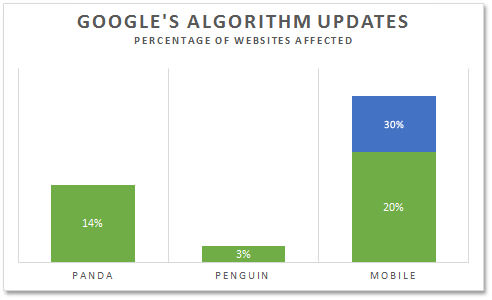
If however you are interested how much the up and coming Mobile algorithm update from Google will affect websites here are the stats!

Googles Mobile Algorithm Update


If you combine the two previous biggest algorithms launched by Google it would not add up to the conservative estimate figure of how many websites will be affected. So this is a BIG deal!

Google’s Panda Algorithm update affected 14% of all websites

Google’s Penguin Algorithm update affected 3% of all websites (which is a lot by the way!)

Google’s Mobile Algorithm update is estimated to affect between 20 – 30% of all websites!! (yes double exclamation marks needed there!)

Don’t hang around and get your website mobile friendly. If you are not sure if your website is mobile friendly or not heard over to our ‘What is a Mobile Website‘ page and you can test yours!